Tools
Build CSP right in your browser.
Watch live CSP violations, rewrite the policy on the fly, or auto-build a strict header, against real production pages, with no deploys.
One extension, three ways to work a Content Security Policy.
Pick the mode that matches where you are, from watching what breaks to shipping a locked-down header.
Observe
Stream every violation from the site's existing CSP into the popup and DevTools panel, mapped line by line to the policy that broke, without changing a thing.
Rewrite
Swap in your candidate policy on the fly. Choose Enforce or Report-Only, Replace or Append, reload, and watch violations stream in as parsed and raw JSON.
Build
Start from a strict report-only base, browse the site normally, and let the extension classify violations by directive and assemble a working policy from real page loads.
See the extension in action.
Two minutes: switching a live page into Build mode, violations arriving classified by directive, and the assembled header copied out ready to paste.
The loop
A five-second feedback loop.
Edit the policy, reload, and see exactly what breaks, against the real page and its real third-parties. No staging, no deploy.
install
One click from the Chrome Web Store, on Chrome, Edge, Brave and Arc. The extension stays inactive until you switch it on for a site.
pick a mode
Choose Observe, Rewrite, or Build depending on whether you're watching, testing, or authoring.
iterate
Edit the policy and reload. Each pass gives you five-second feedback against real third-parties.
ship
Ship it as Content-Security-Policy-Report-Only first, watch the reports, then switch the header to Content-Security-Policy.
Alternatives
Three ways people test a policy.
The other two work. Neither gives you all four at once.
| This extension | A header editor | Report-Only on staging | |
|---|---|---|---|
| Sees real violations | Streamed as they fire | No violation view | Only staging traffic |
| Keeps the policy enforced | Enforce or Report-Only | Whatever you set | Report-Only blocks nothing |
| Builds a policy for you | From real page loads | You write it | From collected reports |
| Works without a deploy | No server change | Needs a server change | A deploy per iteration |
Everything you need to get a policy right.
A full CSP toolkit in the toolbar, from live rewriting to a copy-ready header.
Rewrite live headers
Replace or append the CSP on any response, in Enforce or Report-Only, without touching the server.
Live DevTools panel
A panel in DevTools streams every violation the instant it fires, classified by directive, with the parsed report and the raw JSON side by side.
Auto-build policies
Turn observed traffic into a strict policy, classified by directive and grounded in real page loads.
Copy-ready headers
Generate a clean, deploy-ready Content-Security-Policy header you can paste straight into your config.
Fully local
No accounts, no telemetry, no outbound calls. Everything runs and stays inside your browser.
Works on production
Test against the real page and its real third-parties. A CSP you can't test against the real page is a guess.
Beyond the browser
The extension builds the policy. The platform keeps it honest.
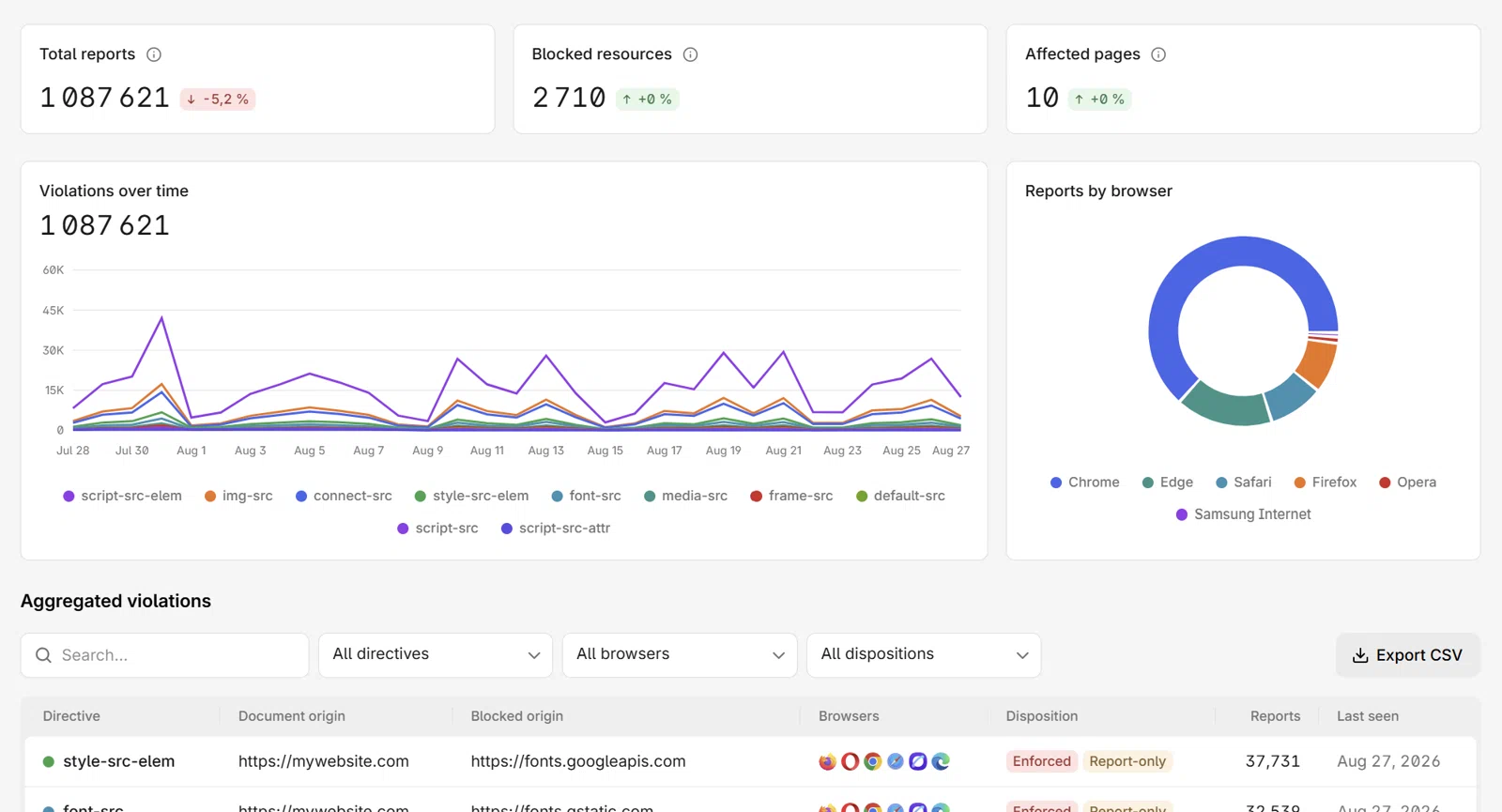
The extension is a single local session in one browser, so it cannot see what other visitors' browsers report. That is what continuous collection is for: author in the browser, then monitor the same policy in production around the clock.

From one-off testing to continuous protection
The extension is where you author and debug. The CentralCSP platform then watches that policy in production, around the clock, across every visitor's browser.
Continuous collection
24/7 CSP report collection from your real users' browsers, not a single local session.
Script inventory
Every script on every page, fingerprinted with SHA-256/384/512 hashes and checked for known CVEs.
Alerts and PCI evidence
Real-time Slack and webhook alerts on new origins and scripts, plus auditor-ready PCI DSS v4 evidence.
Further reading
Build the policy, then keep it honest
Reading violations, choosing report-only or enforce, and the workflow the extension is a step in.
More free tools
Keep auditing with the other free tools
Every tool is free, runs without an account, and scores with the same severity scale.
CSP evaluator
Paste a policy that is not deployed yet and get the same scoring and findings as a live scan, no URL required.
- Audit before you ship
- Same scoring engine
CSP scanner
Fetch a URL's live Content-Security-Policy and score it against known bypasses, wildcard sources and missing directives.
- Directive-level findings
- Shareable results link
Reporting API checker
Check that violation reporting actually works: endpoints, Reporting-Endpoints and Report-To, and which security features really report.
- Endpoint and feature mapping
- Silent drops flagged
CSP hash generator
Turn an inline script or style into the hash that lets it run under a strict policy, right in your browser.
- Runs entirely client-side
- SHA-256, 384 and 512
FAQ
Extension questions, answered
The essentials on installing, privacy, and how the extension fits with the platform.
Start building your CSP in the browser.
Add the extension in one click. It's free, local, and needs no signup. Rated 5.0 by 600+ users on the Chrome Web Store.