Policy builders
Strict CSP and policy headers, built from real traffic.
A strict Content Security Policy is your best defense against cross-site scripting, and the hardest header to write by hand. CentralCSP builds it from what real browsers report, not from a crawler's snapshot of your homepage, and the same reports build your Permissions-Policy and Connection-Allowlist.
From real traffic
Not a crawler snapshot
Report-only first
Enforce when it's clean
Value by value
Every source explained
Dashboard, API or MCP
Same builder, same answer
Three builders
One set of reports, three policy headers.
Each builder reads the reports its header sends and proposes the strictest value your real traffic allows. Every plan includes all three.
Content-Security-Policy
Controls which scripts, styles, frames and connections your pages may load. The strongest defense you have against cross-site scripting and injected scripts.
- Built from CSP violation reports
- Detects the policy you already serve
- Nonces and 'strict-dynamic' handled
Permissions-Policy
Switches off the browser features your pages never use, like the camera, microphone, geolocation or the payment sheet, for your pages and every frame you embed.
- Built from violation and potential-violation reports
- 25 features, denied by default
- Frames granted by origin
Connection-Allowlist
Limits where your pages can send data. Every destination not on the list is blocked, so an injected script has nowhere to send what it steals.
- Built from Connection-Allowlist reports
- WebSocket and WebRTC covered
- Redirects blocked unless you allow them
How the builders work
From real reports to a policy you can enforce.
A policy builder turns the violation reports browsers already send into a header. Instead of loading one page in a headless browser, the CSP generator, like the other two builders, reads what every visitor's browser reported across every page they opened, then proposes the policy value by value. Same four steps for all three.
01 - Period
Pick a period
Pick up to 30 days of the reports your visitors' browsers send, with a preset or by dragging across the chart.
02 - Start
Choose a start
Start from our secure baseline, a policy detected in your reports, a preset, or a header you paste in.
03 - Review
Review each value
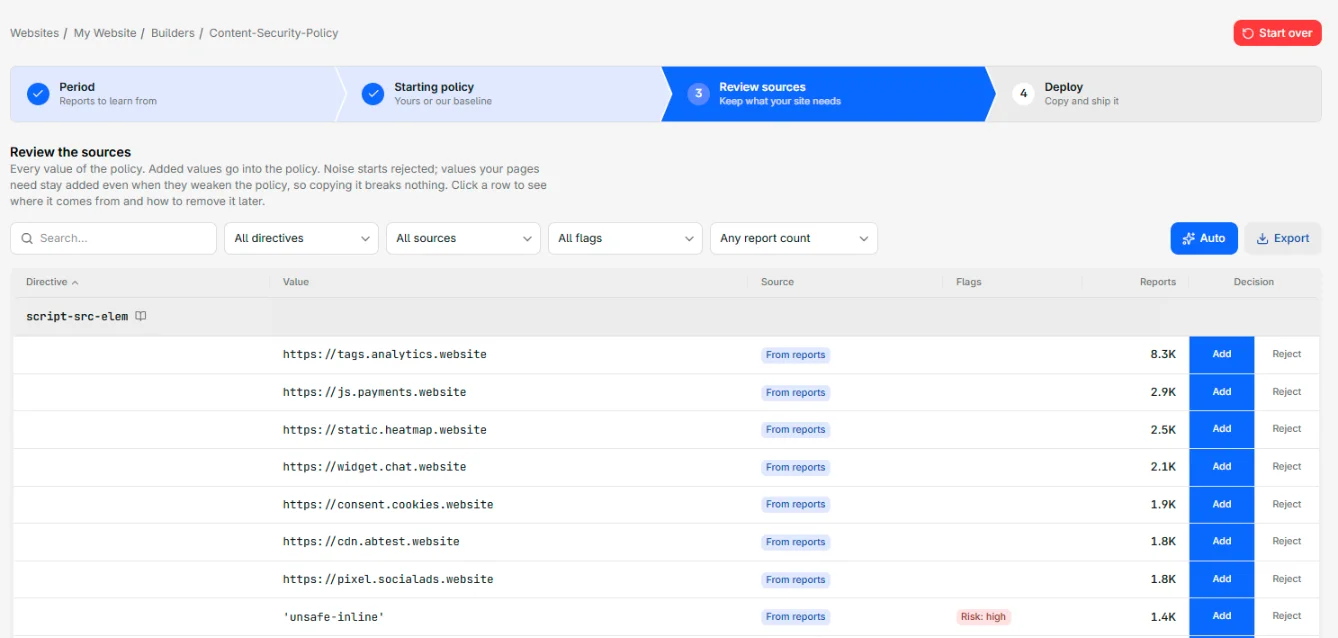
One row per value, with its reports. Noise starts rejected: add or reject the rest, or let Auto decide.
04 - Deploy
Copy and ship it
Copy both headers or export them as a text file. Run report-only for a week, then enforce the same policy.
CSP builder
A strict Content Security Policy, value by value.
The CSP builder is the deepest of the three: it detects the policy you serve, filters extension noise and knows how nonces change a policy.

Start from the policy you already serve.
If your site already reports to CentralCSP, the builder reads the policies inside those reports and tells you which one is live, which covers only part of the site and which was replaced. Start from yours and it gains the protections the baseline adds, without losing anything it allows. No CSP yet? Start from the CentralCSP baseline: default-src 'self', object-src 'none', frame-ancestors 'none' and nothing third-party allowed.
- Live, partial and old policies detected
- Nonce-based policies recognized
- A secure baseline when you have none

You decide every value before it ships.
Every value the builder proposes carries its evidence: how many reports it drew, its share of the directive, the days it was active, and the browsers, pages and code that reported it. A real dependency is obvious. Browser-extension sources, known injectors such as adware and coupon tools, and one-off bursts from a single browser are flagged as noise and start rejected, so they never land in your allowlist. Add what's real, reject the rest, or let Auto decide.
- The evidence behind every value
- Extension and injector noise starts rejected
- Add or reject, value by value
Safe to copy today, stricter every release.
A policy that breaks checkout never ships, so everything your pages rely on today starts added, even a value that weakens the policy. None of it slips through quietly: each weak value carries a risk flag from our CSP evaluator and the steps to remove it, like moving an inline script into a file or giving it a nonce. Where your policy uses nonces, the builder adds 'strict-dynamic' and rejects 'unsafe-inline' for you. And before you deploy, the evaluator grades the finished policy.
- Risky values flagged, with the fix
- Nonces and 'strict-dynamic' handled for you
- Evaluator findings before you deploy
Beyond CSP
Two more policy headers, built the same way.
Permissions-Policy and Connection-Allowlist come from the same reports, the same four steps and the same review table. Few sites send either, because nobody wants to write them by hand.
Permissions-Policy: deny every feature your pages never use.
Browsers never report the Permissions-Policy a page was served with, so you start from a preset or paste yours. The builder then reads the violations from your own pages and the potential ones from iframes asking for a feature. What your pages used is granted to your own origin, what a frame asked for goes to that frame's origin, and a feature only a third-party script reached for stays denied: granting it would hand the camera or the payment sheet to that script.
- 25 features, denied by default
- Frames granted by origin, with the allow attribute they need
- Third-party script requests stay denied
Connection-Allowlist: an egress allowlist from the connections your pages make.
Start from your own origin and add only the destinations real browsers were blocked from reaching. Once three or more subdomains of one site are kept, they fold into a single pattern. WebSocket and WebRTC connections get their own groups, and redirects stay blocked unless a sign-in or payment step bounces through another site. Only Chromium-based browsers enforce it today, so keep CSP connect-src alongside it.
- Starts from your own origin, never from a reported list
- One pattern for three or more subdomains
- WebSocket, WebRTC and redirects decided apart
Approaches
Three ways to get a Content Security Policy.
A CSP is only as good as its coverage. Here is the honest comparison between writing one by hand, scanning a page for one, and building it from the traffic you already have.
| CentralCSP | Crawler / scanner | By hand | |
|---|---|---|---|
| Covers pages behind a login | Every visited page | Homepage only | If you remember it |
| Sees conditional third parties | Real sessions catch them | Missed if not triggered | Only what you know |
| Filters browser-extension noise | Flagged and rejected | Not distinguished | You guess |
| Stays current as the site changes | Rebuild from fresh reports | A one-time snapshot | Manual rewrite |
| Reaches enforcement safely | Report-only, then enforce | Starter policy only | Days of testing |
| Builds Permissions-Policy and Connection-Allowlist too | From the same reports | CSP only | Two more headers to write |
There is a fourth way: inject a report-only policy locally with a browser extension and build from what that one browser sees. It is genuinely good for authoring and debugging a single page, and our Chrome extension does exactly that, free. Whole-site coverage still needs real traffic, because one browser on one page is not your site.
API and MCP
Every builder is one API call away.
The dashboard, the REST API and the MCP server run the same builders, so they give the same answer. Ask for a recommended policy over a period, optionally starting from yours, and get the header back. Nothing is saved.
- One REST endpoint per header
- Three MCP tools for AI agents
- On the Business and Scale plans
Alerting
A new source shows up? You hear about it.
The same reports that build your policy can page you. When a script loads from an origin your policy never allowed, CentralCSP posts it to Slack, Teams, Google Chat, Telegram or email before the next visitor loads the page.
- New-origin and hash-change rules
- Violation spikes after a deploy
- Routed to the channel that owns the page
'%20gradientUnits='userSpaceOnUse'%3e%3cstop%20offset='0'%20style='stop-color:%235a62c3'/%3e%3cstop%20offset='.5'%20style='stop-color:%234d55bd'/%3e%3cstop%20offset='1'%20style='stop-color:%233940ab'/%3e%3c/linearGradient%3e%3cpath%20d='M21.8%20125h218.3c12.1%200%2021.8%209.8%2021.8%2021.8v218.3c0%2012.1-9.8%2021.8-21.8%2021.8H21.8C9.8%20387%200%20377.2%200%20365.2V146.8c0-12%209.8-21.8%2021.8-21.8'%20style='fill:url(%23microsoft-teams_svg__SVGID_1_)'/%3e%3cpath%20d='M188.4%20208.1h-43.6v118.8H117V208.1H73.5V185h114.9z'%20style='fill:%23fff'/%3e%3c/svg%3e)
Check your headers
What does your site send today?
Two minutes, no account: scan your live headers and see whether you have a Content Security Policy at all, how strict it is, and which origins can run code on your pages right now.
Free, no account needed. Results land on a shareable page. Check which policy headers you send today.
Further reading
How a policy gets built, in detail
The builder itself, report-only, the three headers, and shipping the finished policy on whatever stack you run.
FAQ
Frequently asked questions
Building a CSP, a Permissions-Policy or a Connection-Allowlist, filtering noise and rolling it out, answered.
Start collecting today. Enforce when you're ready.
Ship one report-only header this afternoon, then build your CSP, Permissions-Policy and Connection-Allowlist from what real browsers report. 14-day free trial, no agent, no page script.