

Review table
In the CSP builder, the review table decides which values go into your Content Security Policy. Columns, default decisions, filters, and the details panel.
Last update:
The review table on the Review sources step of the CSP builder lists every value your Content Security Policy (CSP) could hold. Each row carries a decision, Add or Reject. The headers on the deploy step contain only added values.
Columns
The table has one row per value of a directive. It holds the values of your starting policy and every source browsers reported in the period. It has these columns:
| Column | Meaning |
|---|---|
| Directive | The directive the value belongs to, with a link to its reference page |
| Value | The host source, keyword, or scheme, such as https://cdn.example.com, 'self', or data: |
| Source | Where the value comes from, as listed in Value sources |
| Flags | A risk chip when the evaluator finds a security issue, and Noise when the source looks like noise |
| Reports | How many reports named this source in the period, empty for values of the starting policy |
| Decision | Add to put the value in the policy, or Reject to leave it out |
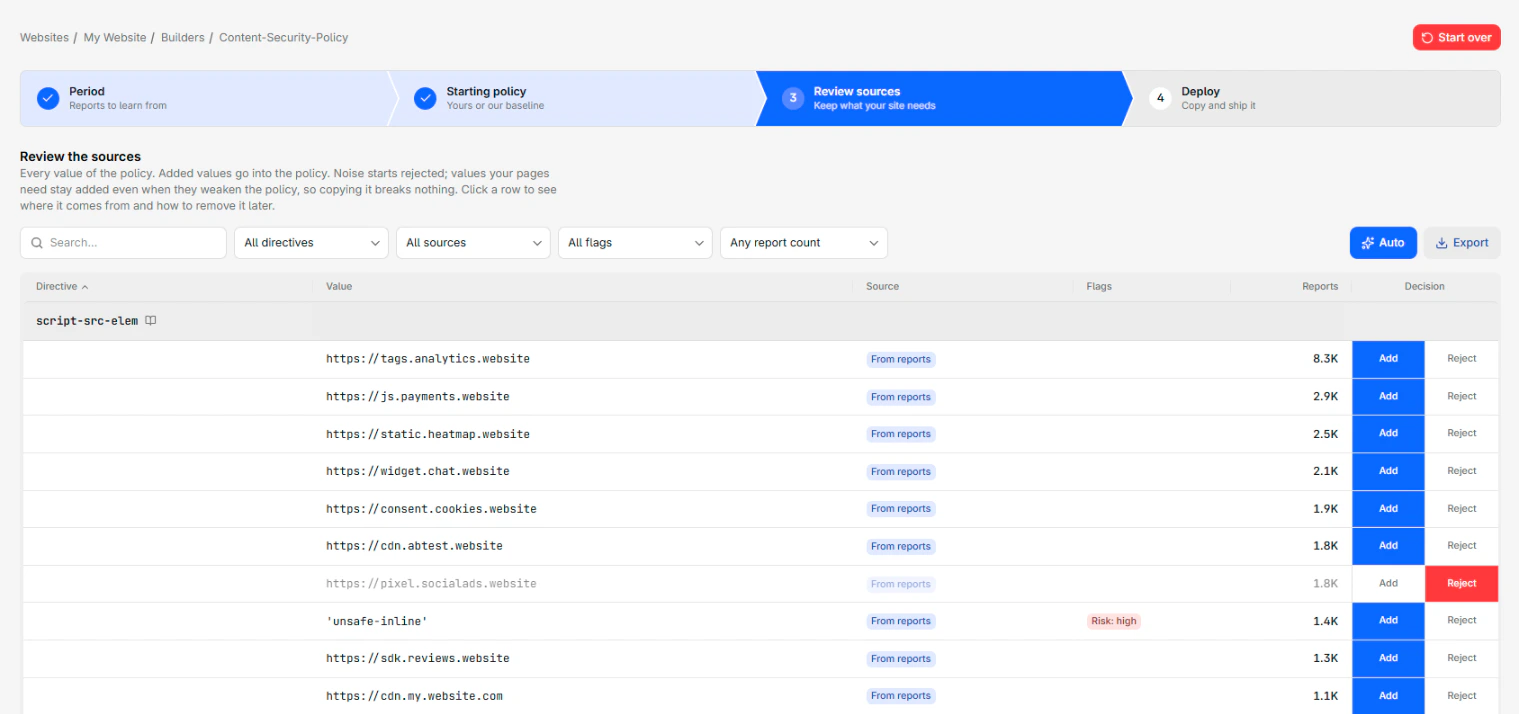
Rejected rows stay in the table, dimmed, so you can add them back. To sort, select a column header. Sorting by Directive groups the rows under one heading per directive.
Value sources
The Source column shows one of four labels:
| Label | Meaning |
|---|---|
| Baseline | Part of the CentralCSP baseline, when you started from it |
| From your policy | Part of the detected policy you started from, kept as it is |
| Recommended | Missing from the policy you started from, and added because the baseline has it |
| From reports | Reported by browsers in the period |
Values from your policy are kept so that nothing that works today breaks. A reported source that your starting policy already allows still gets its own From reports row, so you can see how often your pages use it.
Default decisions
The builder decides every row before you touch it:
- Values of the starting policy start added.
- Reported sources start added, including risky ones, because your pages load them today.
- Sources flagged as noise start rejected.
- A reported
'unsafe-inline'starts rejected when the same script or style directive uses a nonce. Browsers ignore'unsafe-inline'next to a nonce, so adding it changes nothing.
Your own decisions always win over these defaults. They also survive a change of period on the first step, so you can widen the period without losing your work.
Adding 'none' rejects every other value of its directive, because 'none' cannot be combined with anything.
Filters
The toolbar narrows the table with a search field and four filters:
- The search field matches the directive, the value, and the exact URL browsers reported.
- All directives shows one directive.
- All sources shows one value source.
- All flags shows one risk level, from critical to info, or only noise.
- Any report count shows sources with at least, or fewer than, 10, 100, or 1,000 reports.
Each filter offers only the options the table holds.
Auto
The Auto button puts every row back to its default decision. The builder adds every source that is not noise, rejects noise, and restores every value of the starting policy. A notification says how many sources were added and rejected.
Export
The Export button downloads the rows the filters keep as a CSV file, in table order. The file has the Directive, Value, Source, Flags, and Reports columns, and a Highest finding column with the most severe evaluator finding on the value. Each export is recorded in the audit log, with the row count and the active filters.
Details panel
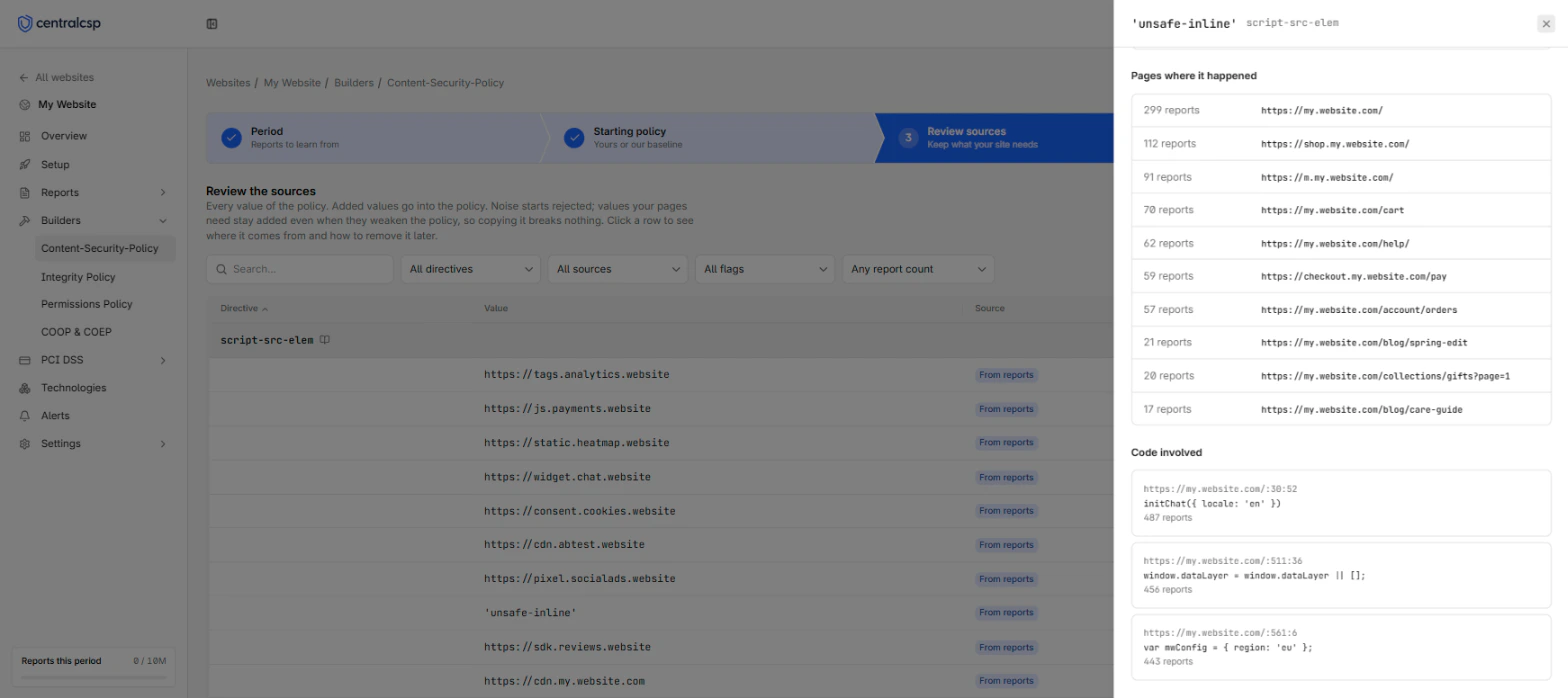
Selecting a row opens its details panel. The panel gathers the evidence behind the value, so you can decide whether your pages really need it. It holds these sections:
| Section | What it shows | What it tells you |
|---|---|---|
| What this value does | What the keyword or scheme allows, absent for a plain host | How much the value opens up, for example that 'unsafe-inline' lets an injected script run |
| Why it was suggested | What browsers blocked or reported, and how many times | Whether the value is new, or already allowed by the policy you started from |
| Why it is in the policy | Why the baseline or your starting policy holds the value | That the value comes from a policy, not from a report |
| In numbers | The report count, the share of the directive's reports, the days active, the browsers, the mode, and the first and last time the source was reported | Whether the source is steady traffic or a one-off |
| Pages where it happened | The pages that triggered the reports | Whether the source loads on pages you know, such as your checkout |
| Code involved | The script file, line, and code sample from the reports, when browsers sent one | Whether the code is yours, a vendor's, or something you do not recognize |
A source reported every day, from every browser, on the pages you expect, is almost always one your site loads. A source seen on one day, from one browser, on a single page, is usually a visitor's extension. The First seen date matters too: a script origin that appeared yesterday, on your payment page, deserves a closer look before you add it.
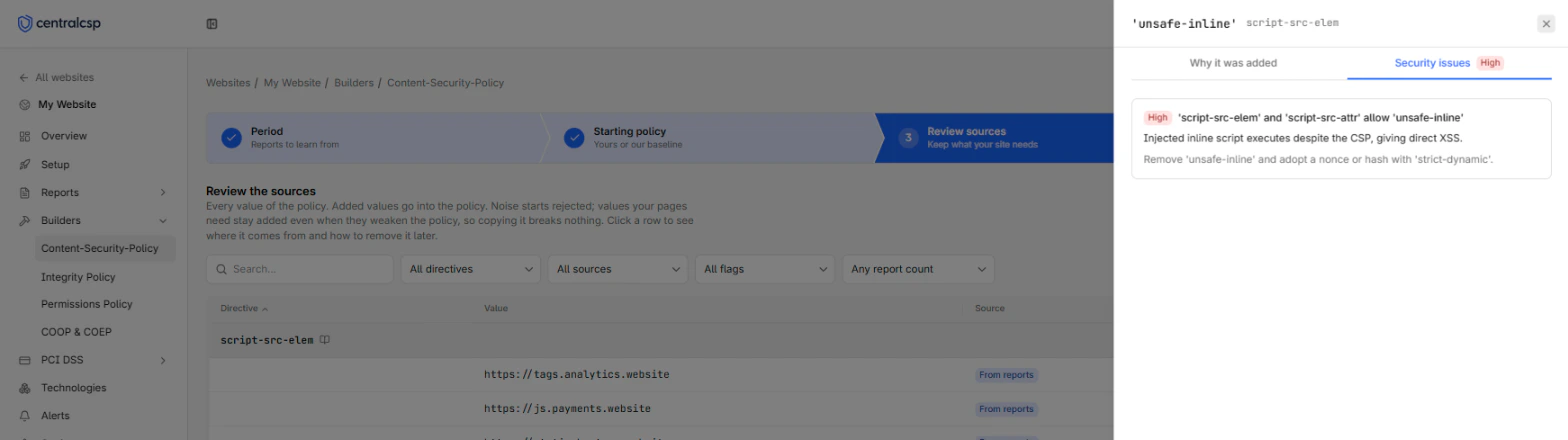
When the CSP evaluator finds a security issue on the value, a Security issues tab lists each finding with its severity, impact, and recommendation.
Callouts
The panel shows a callout when a value needs attention:
| Callout | Meaning |
|---|---|
| Detected as noise, rejected by default | The source most likely comes from outside your site, with the signals behind the verdict |
| Rejected because your policy uses a nonce | A reported 'unsafe-inline' that the nonce makes useless, so give the inline code the nonce instead |
| Only older browsers read this value | An 'unsafe-inline' in script-src or style-src that modern browsers skip in favor of the script-src-elem and script-src-attr directives, or their style equivalents |
| Needed today, worth removing | A risky value your pages rely on, with the code change to make before you remove it |
To act on the last callout, refer to Remove a risky value.
Decide whether to keep a value
Add a value when your pages need it. Reject it when your pages do not need it, or when you do not know where it comes from. A rejected value is blocked once you enforce the policy, so rejecting a value your pages need breaks them. Rejecting an unknown script source is how the policy protects you.
Add the value in cases like these:
| Value | Evidence in the details panel | Decision |
|---|---|---|
https://www.googletagmanager.com in script-src-elem | Thousands of reports, every day of the period, from every browser, on every page | Add, it is your tag manager |
https://fonts.gstatic.com in font-src | Reported on every page since the start of the period | Add, it serves your web fonts |
'self' in img-src | The blocked URLs are on your own website | Add, your own images must load |
data: in img-src | Reported on pages that show small inline images or icons | Add, the risk is low outside script directives |
'unsafe-eval' in script-src | The code sample points at a library you use, on every page | Add for now, then plan its removal with the Needed today, worth removing steps |
Reject the value in cases like these:
| Value | Evidence in the details panel | Decision |
|---|---|---|
https://translate.example.net in script-src-elem | Flagged as noise, reported on one day from one browser | Reject, it is a visitor's extension |
An origin you do not recognize in script-src-elem | First seen yesterday, only on your checkout, loading a script file you do not recognize | Reject, then investigate it as a possible injection |
http://cdn.example.com in any directive | The resource loads over plain HTTP | Reject, serve it over HTTPS and allow the https:// address instead |
'unsafe-inline' in a script directive of a policy with a nonce | The Rejected because your policy uses a nonce callout shows | Keep it rejected, give the inline code the nonce instead |
| A host your team removed from the site last month | Reported only in the first days of the period | Reject, or pick a period that starts after the change |
Do not add a value only to silence a report. The report was the only sign that the resource loads at all. For inline code, refer to Nonces and unsafe-inline.
Notes
Reports that name nothing a policy can allow, such as a Trusted Types violation, are left out. A note gives their count. The table lists at most the 1,000 most reported sources, and a note says so when the rest were cut.
Next steps
Get started
Build a Content Security Policy from your reports with the CSP builder. Pick a period and a starting policy, review sources, then deploy in report-only mode.
Nonces and unsafe-inline
How the CSP builder handles inline scripts and styles, and how to move your policy from unsafe-inline to a nonce without breaking your pages.