

Remove a risky value
Take a risky value such as unsafe-inline out of your Content Security Policy without breaking your pages, using the CSP builder to find and confirm the change.
Last update:
The CSP builder keeps risky values that your pages load today, so the policy you deploy breaks nothing. This page removes one of them, such as 'unsafe-inline', after you change the code that needs it.
Before you begin
Make sure you have:
- A Content Security Policy (CSP) built with the CSP builder and deployed. Refer to Get started.
- Access to the code of the pages that load the value.
Remove the value
To remove a risky value:
- In the website sidebar, go to Builders > Content-Security-Policy, and continue to the Review sources step.
- In the flag filter, select the most severe risk level.
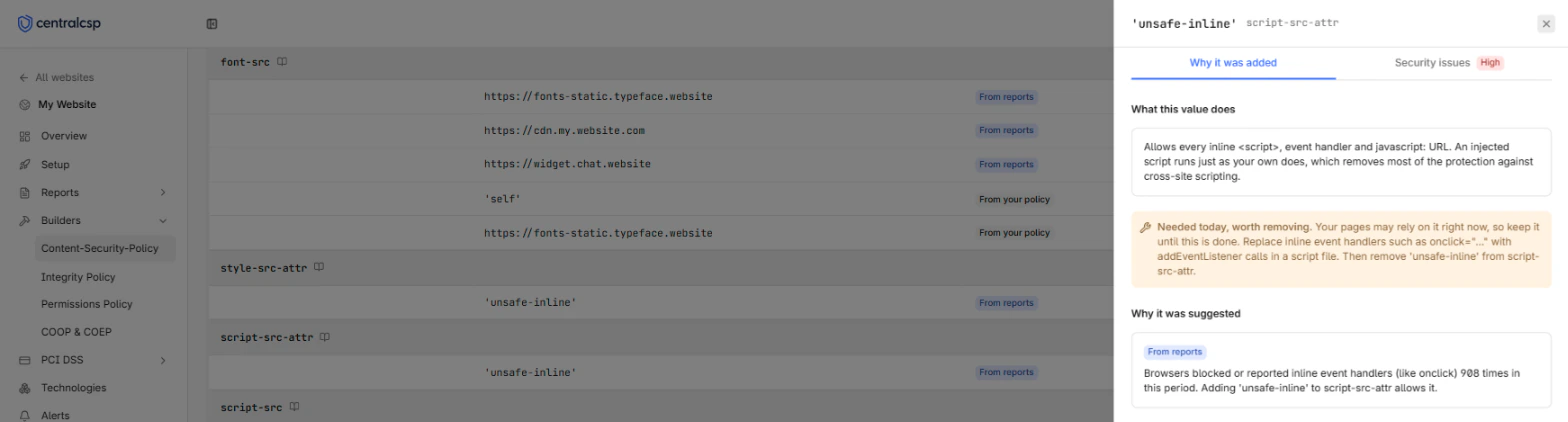
- Select a row, then read the Needed today, worth removing callout. For example, it asks you to replace inline event handlers with
addEventListenercalls before you remove'unsafe-inline'. - Make that change in your code, and deploy it.
- Wait until the reports cover a full period after your deploy, then run the builder again on that period.
- Search for the value. Check that no From reports row remains for it in that directive, then select Reject on each of its rows.
- On the Deploy step, copy the headers and deploy them.
The value is gone from your policy, and its risk no longer appears in the grade on the Deploy step. If a From reports row remains in step 6, a page still needs it. Select the row and check Pages where it happened.
Next steps
Nonces and unsafe-inline
How the CSP builder handles inline scripts and styles, and how to move your policy from unsafe-inline to a nonce without breaking your pages.
Builder decision rules
The rules the CSP builder follows to turn violation reports into sources, flag noise, detect the policy you serve, and fill in the CentralCSP baseline.