Would CSP and PCI DSS have stopped the Optimizely attack?

CentralCSP Team
CentralCSP ·
Last update:
This post takes the Optimizely attack (OPTIMJACK) control by control, for the people who own client-side security and PCI DSS compliance: which Content Security Policy settings blocked it, which let it through, and how each one maps to PCI DSS requirements 6.4.3 and 11.6.1. If your site runs Optimizely, or any marketing or testing tag, it answers two questions: would your security settings have stopped it, and would your PCI DSS controls have noticed?
On 16 November 2026, an attacker slipped malicious code into Optimizely Web Experimentation snippets. The code was served from Optimizely's own servers, the same file customer sites had chosen to trust, and for most of them it ran for about 16 hours, according to StepSecurity. It tried to swap crypto wallet addresses, steal card numbers typed into on-page forms (a Magecart-style skimmer), capture screenshots, steal cookies, and load exploits on older iPhones. For the timeline of the attack itself, read our explainer, the Optimizely supply chain attack (OPTIMJACK).
The short answer:
- Trusting the vendor's domain did not help. The bad code came from
cdn.optimizely.com, a domain every customer had allowed. - A strict list of allowed sites stopped the main payload, unless the policy also allowed
'unsafe-eval'or used'strict-dynamic'. Only 24 of the 159 affected organisations in a crawl of their sites blocked it. - Limiting where the page may send data stopped the card and cookie theft, but not the wallet address swap.
- Cards entered in a payment provider's iframe (Stripe, Adyen and similar) were out of reach. Cards typed into the site's own form fields were not.
- PCI DSS 6.4.3 and 11.6.1 describe exactly this case: an authorized script whose content changed. Teams that watched real browsers for script changes and new destinations would have seen a warning sign the same day.
What happened in the Optimizely attack
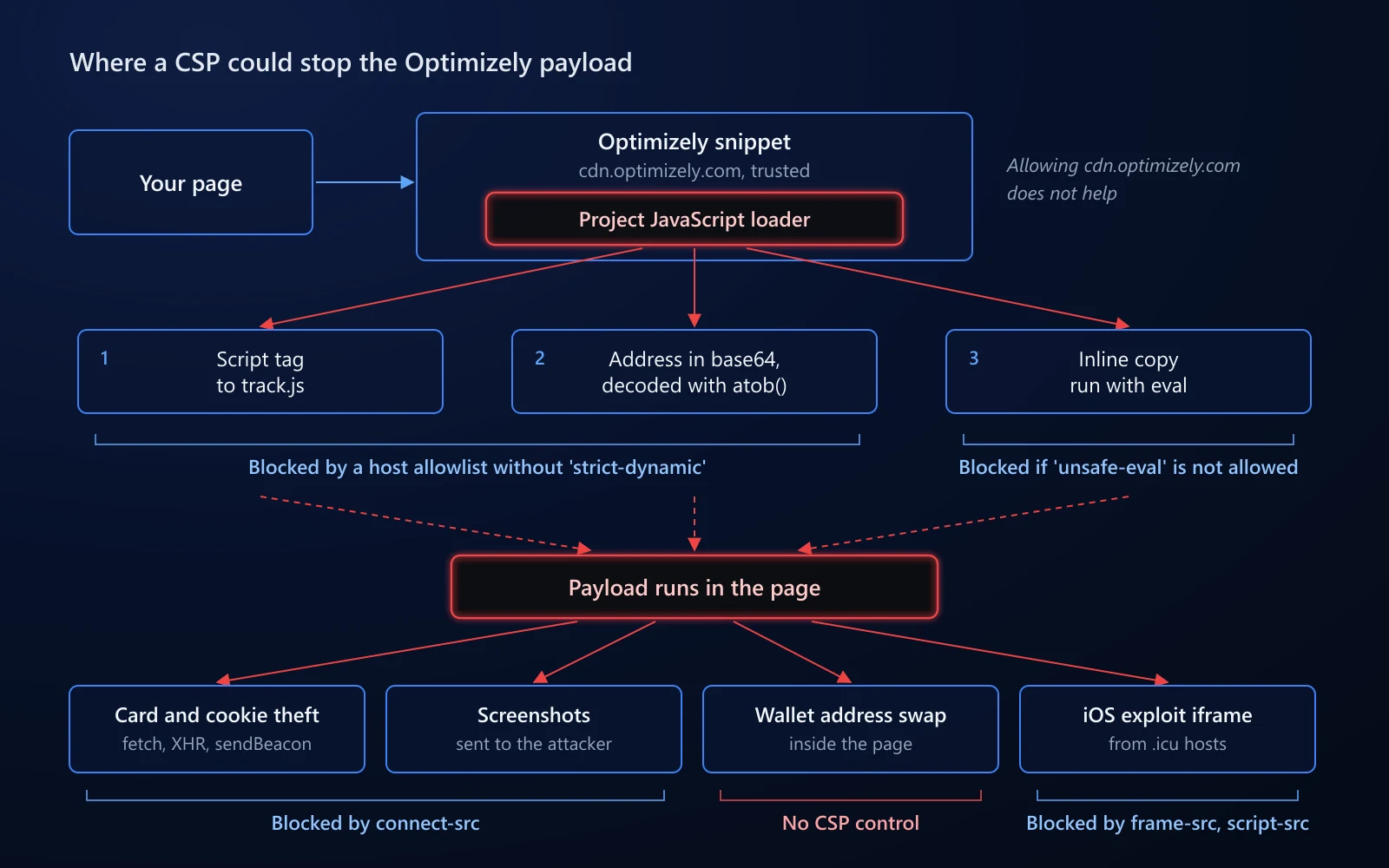
Each Optimizely Web Experimentation customer adds one script tag, the "snippet", served from cdn.optimizely.com; according to Optimizely, the attacker abused a legacy free-trial sign-up flow to impersonate users at customer accounts and edit the snippet's optional Project JavaScript field, which Optimizely's CDN then served as it would any edit. The loader came in three variants: a plain script tag pointing to 1688360[.]cc/track.js, the same address hidden in base64 and decoded with atob() so a text search for the domain finds nothing, and a full inline copy of the payload run through eval when the domain is blocked. Keep the third variant in mind, because it decides which policies held; the hour-by-hour timeline, the payload and the indicators of compromise are in our OPTIMJACK explainer.
How many affected sites had a CSP that blocked it
A Content Security Policy (CSP) is the header that tells the browser which scripts may run and where the page may send data. The researchers at Report URI, who found the attack, crawled 256 hosts of the affected organisations and compared each one's CSP with what the payload needed. Hosts and organisations are not the same unit: the 256 hosts belong to fewer organisations, and the results below are counted per organisation:
| What the CSP did | Organisations |
|---|---|
| No CSP at all | 68 |
| CSP allowed both the payload and the data theft | 50 |
Payload ran, but connect-src blocked the data theft (address swapping still worked) | 17 |
| Payload blocked | 24 |
The four groups add up to 159 organisations, and the researchers give the last row as 15%.
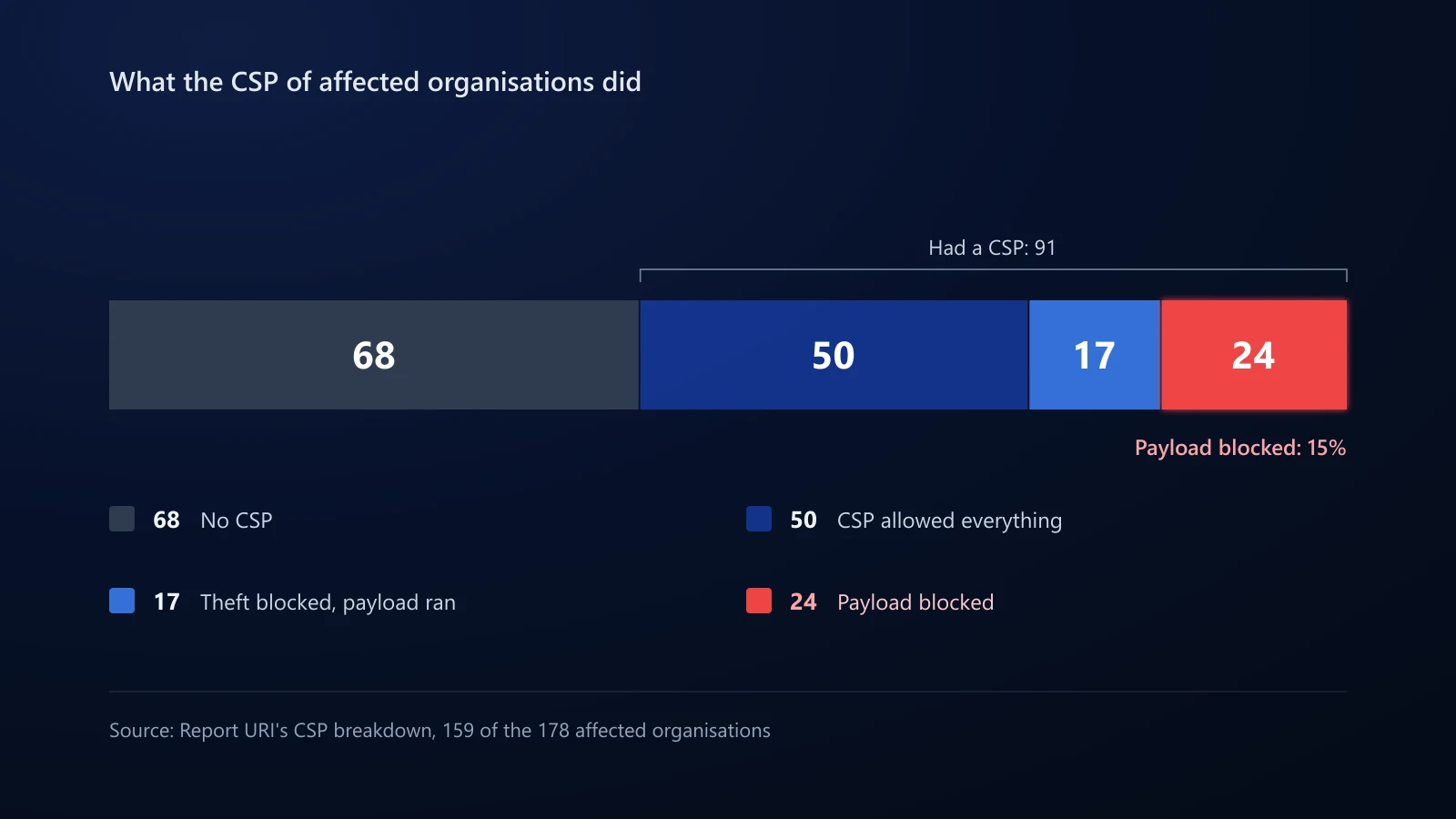
So on most sites that had a CSP, the payload still ran. Here is why.
Which CSP settings held, and which failed
Allowing cdn.optimizely.com: no help
Every Optimizely customer with a CSP allows the snippet host, otherwise experiments do not run. The malicious loader arrived inside that allowed file. Optimizely puts it plainly: "Allowing cdn.optimizely.com alone didn't help, because the code came from our own host." A domain allowlist answers "who may serve code", not "is this code what we approved".
A strict host allowlist: it stopped track.js
A script-src that lists only the hosts you need blocks a script tag pointing to an unknown domain. That stopped the first two variants: the decoded address still points to 1688360[.]cc, which is not on the list. It also blocks the iOS stage, which loads its scripts from .icu domains.
'strict-dynamic': it let the payload through
'strict-dynamic' tells the browser to trust any script that an already trusted script adds to the page, and to ignore the host list. It is the usual way to make a nonce-based policy work with tag managers, as strict-dynamic explained covers. Here it worked against the sites that used it: the Optimizely snippet was trusted, so the track.js tag it inserted was trusted too. The researchers and StepSecurity both reach this conclusion.
The CSP guide Optimizely publishes recommends a nonce with 'strict-dynamic'. That is a reasonable default for most pages. It does not protect you when the trusted script itself is compromised.
'unsafe-eval': the fallback that beat a good policy
'unsafe-eval' lets a page turn text into running code. The researchers describe it as something "Optimizely's own documentation tells customers to allow"; Optimizely's current CSP guide does not list it. They give the case of a large bank whose policy blocked track.js and the data theft, while "the inline copy still ran" through eval. Without 'unsafe-eval', that third variant fails. Our guide to what unsafe-eval does and how to remove it covers the alternatives.
connect-src: it stopped the theft, not the swap
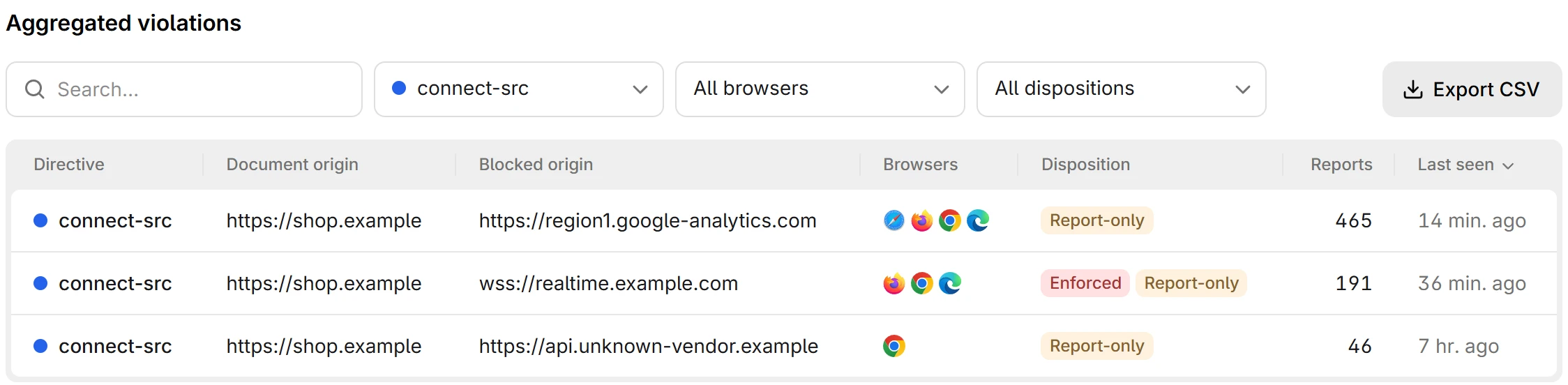
connect-src lists the addresses a page may contact with fetch, XHR or navigator.sendBeacon. The skimmer sent cards to 1688360[.]cc/card.php with sendBeacon, and screenshots and cookies to the same server, so a tight connect-src blocked them. That is what saved the 17 sites in the third row. It could not stop the crypto clipper, because swapping a wallet address happens inside the page and sends nothing anywhere. To limit every outgoing connection a page makes in Chrome, not only those from scripts, see Connection Allowlists.
frame-src: it stopped the iPhone stage
On iPhones and iPads running older iOS versions, the payload added a hidden iframe from .icu hosts to deliver exploit chains. Optimizely's own guide restricts frame-src to Optimizely hosts, and a policy that follows it blocks that iframe.
Subresource Integrity: not possible here
Subresource Integrity (SRI) pins a script to a known hash, so the browser refuses it if one byte changes. It is the right tool for a fixed library file, as our SRI guide explains. An Optimizely snippet changes every time a team publishes an experiment, so it cannot be pinned to one hash. StepSecurity makes the same point, and the PCI SSC's information supplement on payment page scripts calls SRI "not practical for rapidly changing scripts".
Report-only CSP: no block, but a signal
A policy in report-only mode blocks nothing and sends a report for everything it would have blocked. Optimizely's own sites show both sides: according to its write-up, its enforced CSP blocked the code on www.optimizely.com, while on login.optimizely.com the policy was in report-only mode and the code was served. A report-only policy that does not allow the attacker's hosts still produces violation reports naming the new script host and the new data destinations. Whether anyone acts on them depends on where the reports go. Our guide to moving a CSP from report-only to enforced covers that path.
Hosted payment fields: the control that worked best
The researchers and Optimizely agree: cards entered in iframes served by payment providers, such as Stripe or Adyen, were out of the skimmer's reach, because a script on your page cannot read the contents of an iframe from another origin. The skimmer only caught cards typed into the site's own form fields.
What PCI DSS 6.4.3 and 11.6.1 say about the Optimizely attack
Two requirements of PCI DSS 4.0.1 cover scripts on payment pages, and this incident tests both.
Requirement 6.4.3 asks that each payment page script is authorized, that its integrity is assured, and that it appears in an inventory with a written justification. Where a team had approved Optimizely for its payment pages, the authorization step was done. The failure was integrity. The approved script started serving different content, and a domain allowlist or a one-time approval does not notice that. Our 6.4.3 guide explains why the PCI SSC accepts authorization "as soon as possible after" a third-party change, and why observed hashes work where SRI cannot.
Requirement 11.6.1 asks for a mechanism that alerts personnel to unauthorized changes to payment page scripts and security headers, "as received by the consumer browser", at least once every seven days, or at the frequency set by a targeted risk analysis. Two details matter here:
- The window was about 16 hours. A weekly crawl could miss the whole attack. The PCI SSC itself recommends frequent or real-time monitoring where feasible, as our 11.6.1 guide details.
- Optimizely's PCI mode served the change too. PCI mode serves the snippet from a separate host,
cdn-pci.optimizely.com. Optimizely confirms the attacker's change was deployed through that host as well, and warns that PCI mode does not replace change controls.
The two requirements also appear in a lawsuit. According to PPC Land, a proposed class action filed on 24 November 2026 in the Southern District of New York, Tyree v. Optimizely North America Inc. and Mutual of Omaha Insurance Company (No. 1:26-cv-10341), cites 6.4.3 and 11.6.1. The allegations have not been tested in court.
How CSP reporting and a script inventory would have caught it
An Optimizely snippet changes legitimately each time your team publishes. So "the snippet changed" is not an alarm on its own. The signal is a change you cannot match to a publish in your own Optimizely history, arriving together with destinations your pages never used before. In browser reports, the attack would have shown up three ways:
- The snippet's content changed on payment pages, with no matching publish on your side. Hash reporting with
'report-sha256'records each version of a script as browsers execute it, which is how you build a script inventory with CSP hash reporting. For a cross-origin file like the snippet, the browser computes the hash only when the tag carriescrossorigin="anonymous". When we checked on 29 November,cdn.optimizely.comanswered withAccess-Control-Allow-Origin: *, so the snippet still loads with that attribute. - A new script origin appeared,
1688360[.]cc, then the.icuhosts on iOS. Hash reports list the script URL even when no hash can be computed. - New violations appeared in
script-srcandconnect-src, on any policy that did not allow those hosts, enforced or report-only.
In CentralCSP, those signals map to alerts you can route to Slack, Microsoft Teams, email or a webhook: Changed script to review on payment pages when an approved script serves content nobody approved, New script to review on payment pages for the new loader, New script origin on script hashes, and New violation type on CSP. The PCI DSS alerts page lists them, and the Scripts page keeps who approved each version and when, which is the evidence 6.4.3 and 11.6.1 ask for.
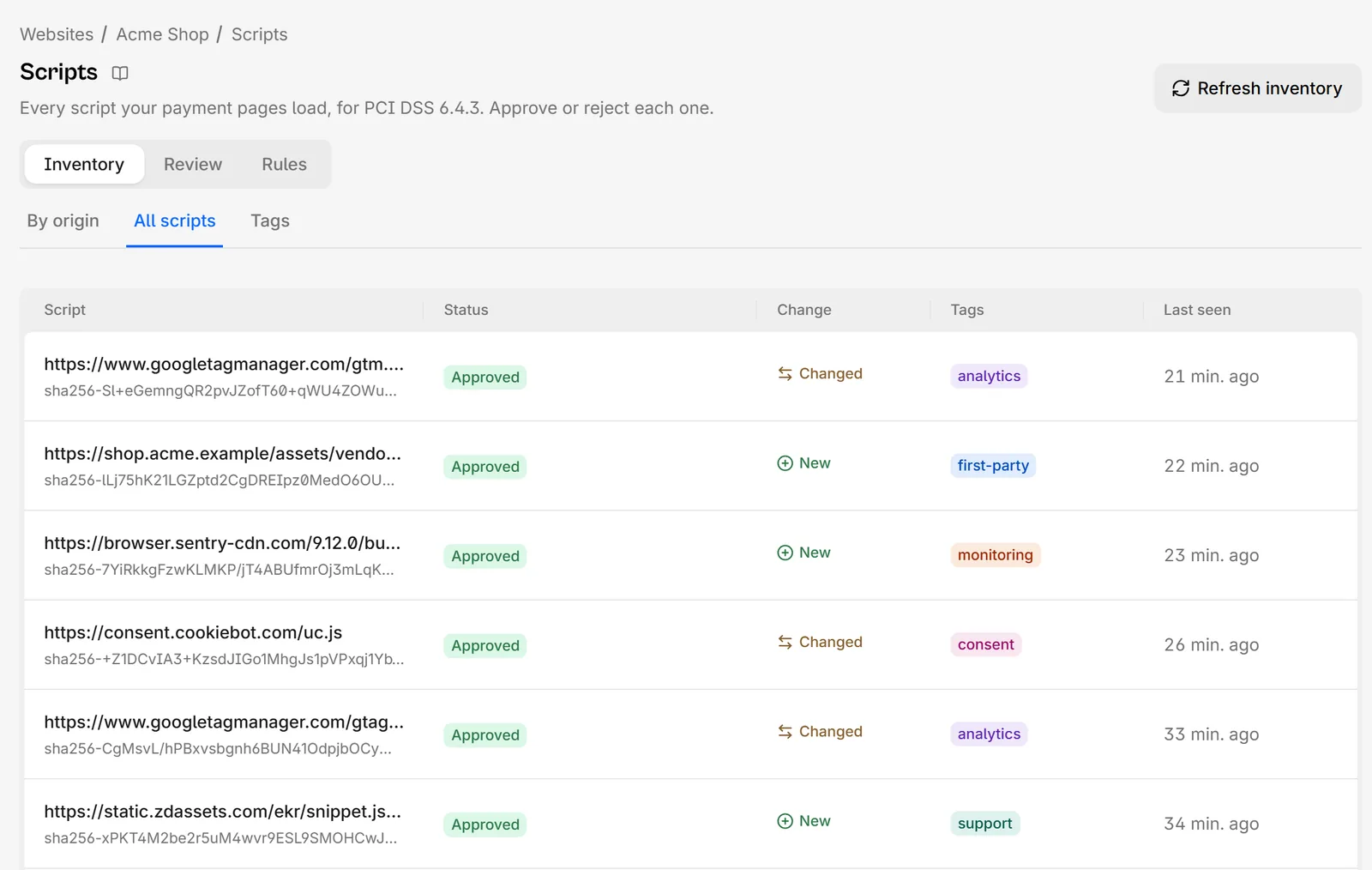
One warning from this incident: a rule that approves every script matching https://cdn.optimizely.com/* keeps the snippet approved when its content changes, by design. That is fine for a payment provider you vetted. For a tag that runs code your marketing team, or an attacker using their account, can edit, approve each version by hand so every change comes back to a person. See Rules.
A checklist for Optimizely, or any tag, on payment pages
- Keep A/B testing and marketing tags off payment pages where you can. The safest script on a checkout is the one that is not there. For a quick outside view of the libraries a checkout loads and their versions, paste its URL into the free Technology Checker.
- Put card entry in your payment provider's hosted fields or iframe. It was the control that held best on 16 November.
- On payment pages, use a strict
script-srchost list without'strict-dynamic'and without'unsafe-eval'. If a tag needs'unsafe-eval', keep that tag off the checkout. Keep'strict-dynamic'for pages where it is the better trade-off. - Restrict
connect-srcandframe-srcto the destinations the page really uses. Our CSP builder turns your reports into that list; run it in report-only for at least a week before enforcing. - Turn on reporting everywhere, including
'report-sha256', so every script and every blocked destination is visible, even under report-only. - Load the snippet with
crossorigin="anonymous"so its content changes can be tracked. - Alert on script changes and new origins on payment pages, and send them to a person who can compare them with your own publish history.
- Review your Optimizely project history weekly and keep Project JavaScript editing to a few named people with SSO and multifactor sign-in, as Optimizely recommends. It advises the weekly history check until you have automatic change alerts in place, such as a project webhook or a scheduled check against its API.
A starting point for a checkout page with no testing tag, where payments.example stands for your payment provider's hosts and reports.example for your reporting endpoint:
Reporting-Endpoints: csp-endpoint="https://reports.example/csp"
Content-Security-Policy: script-src 'self' https://js.payments.example 'report-sha256'; connect-src 'self' https://api.payments.example; frame-src https://js.payments.example; object-src 'none'; base-uri 'none'; report-to csp-endpoint
If you must keep Optimizely on that page, add only the exact Optimizely hosts your project uses: its snippet host in script-src and https://logx.optimizely.com in connect-src. Optimizely now advises the same, because "a whole-domain allowance can't tell your snippet from someone else's", so skip the *.optimizely.com wildcard its CSP guide still lists.
To see every script your own payment pages run, with each version and each new destination, and to be alerted the day one changes, start free with CentralCSP. The PCI DSS page shows how that maps to 6.4.3 and 11.6.1.
FAQ
Would a CSP have stopped the Optimizely attack?
It depended on the policy. A strict host allowlist without 'strict-dynamic' and without 'unsafe-eval' blocked the payload; that was 24 of the 159 organisations in the researchers' crawl. A tight connect-src blocked the data theft but not the wallet address swap. Allowing cdn.optimizely.com alone did nothing.
Should I allow 'unsafe-eval' for Optimizely?
Not on payment pages. Optimizely's current CSP guide does not list it, although the researchers who found the attack say Optimizely's documentation told customers to allow it. During the attack, it is what let the inline copy of the payload run on a site whose policy, according to the researchers, blocked everything else.
Was an authorized Optimizely snippet compliant with PCI DSS 6.4.3?
Only while its integrity was assured. 6.4.3 asks for authorization and integrity for each script, and 11.6.1 asks to be alerted when its content changes. Approving the Optimizely snippet once did not cover the attacker's later change. The 6.4.3 guide covers the requirement in general.
Did Optimizely's PCI mode protect payment pages?
No. Optimizely confirms the attacker's change was also deployed through its PCI host, cdn-pci.optimizely.com, and says PCI mode does not replace change controls.
Could Subresource Integrity have stopped the Optimizely attack?
No. SRI pins a script to one hash, and an Optimizely snippet changes every time a team publishes an experiment, so it cannot carry a fixed integrity value.
Can a CSP stop a skimmer hidden in a trusted vendor script?
Partly. It can block the skimmer's own scripts and its data exfiltration, but it cannot tell an approved vendor file from a tampered one. That is why you also need to detect when a script's content changes. Our guide to Magecart and formjacking detection covers the wider picture.
Related
- The Optimizely supply chain attack (OPTIMJACK), what happened
- PCI DSS 6.4.3: managing payment page scripts
- PCI DSS 11.6.1: detecting script and header changes on payment pages
- What unsafe-eval does in CSP and how to remove it
- strict-dynamic explained
- Why Subresource Integrity protects your CDN scripts
- Moving a CSP from Report-Only to enforced
- Connection Allowlists, a network egress sandbox in the browser
- Magecart and formjacking: how to detect a skimmer
- Build a script inventory with CSP hash reporting
- PaperCut: the WebRTC card skimmer on 80 US newspapers
Sources
- Optimizely, Web Experimentation security incident update (25 November 2026)
- Optimizely status page, Web Experimentation Security Incident
- Optimizely, Update your site's Content Security Policies (CSP)
- StepSecurity, OPTIMJACK: Optimizely-hosted scripts deliver a crypto clipper and card skimmer
- PCI SSC, Payment Page Security and Preventing E-Skimming, Guidance for PCI DSS Requirements 6.4.3 and 11.6.1 (March 2025), document library
- PCI SSC, announcement of the information supplement
- PPC Land, Mutual of Omaha and Optimizely sued over code hack