PCI DSS 6.4.3: managing payment page scripts

CentralCSP Team
CentralCSP ·
PCI DSS requirement 6.4.3 is the one that makes you account for every piece of JavaScript running on your checkout. It exists because card skimmers (Magecart, formjacking, e-skimming) no longer need your server: they ride in on a script the shopper's browser loads, read the card fields, and send a copy elsewhere. Your server logs never see it.
The requirement has been mandatory since 31 March 2025 and is unchanged in the current standard, PCI DSS v4.0.1. This guide covers what it asks for, who it applies to (including the SAQ A change of January 2025), the evidence an assessor expects, and a justification template you can copy. Its companion, PCI DSS 11.6.1, covers detecting changes once the scripts are approved.
The requirement text
PCI DSS v4.0.1 states it this way:
All payment page scripts that are loaded and executed in the consumer's browser are managed as follows:
- A method is implemented to confirm that each script is authorized.
- A method is implemented to assure the integrity of each script.
- An inventory of all scripts is maintained with written business or technical justification as to why each is necessary.
Three elements, then: authorization, integrity, and an inventory with a justification. The PCI Security Standards Council (PCI SSC) published an information supplement on payment page security in March 2025 that explains each one. It is the most useful primary source on the topic and the one quoted throughout this post.
A "payment page script" is defined broadly in the PCI DSS glossary: any programming language commands processed by the consumer's browser on a payment page, including those that interact with the DOM. JavaScript and WebAssembly count. HTML and CSS do not. Analytics, A/B testing, chat and advertising scripts are all payment page scripts if they load on that page.
Authorization
You need a method to confirm each script is authorized. The supplement is explicit that the standard does not say how that method works, who in your organization authorizes, or whether it is manual or automated. Because third-party scripts can change without you knowing, the guidance also accepts authorization before a script is added or changed, or as soon as possible after a change is made.
Integrity
You need a method to assure each script has not been tampered with, checked when a script is introduced and again when it is updated. PCI DSS does not mandate a mechanism. The guidance names Content Security Policy (CSP) and Subresource Integrity (SRI) as examples and leaves room for others:
- SRI pins a script to a hash in the
<script integrity>attribute. It works well for static files and, as the supplement puts it, is "not practical for rapidly changing scripts", which describes most vendor scripts. - CSP hashes and nonces authorize exact content or exact tags. The supplement notes that nonces "do not monitor internal changes within an authorized script".
- Observed hashes: a CSP Level 3 policy with
'report-sha256'makes the browser report a SHA-256 hash of every script it executes. Comparing that hash with the one you approved is an integrity check that also works for scripts that change.
Inventory and written justification
The inventory lists every script on the payment page, each with a business or technical reason for being there. The standard does not say how to keep it. The supplement says that "in simple environments, a spreadsheet might suffice" and that more complex sites use automated tools or workflow systems. The point is the outcome: only known, necessary scripts on the page.
The 3DS exception
Scripts that a 3-D Secure provider runs to perform 3DS do not need 6.4.3 validation, "due to the inherent trust relationship between the 3DS service provider and the merchant". Anything that runs outside that 3DS purpose is still in scope.
Who 6.4.3 applies to
It depends on how your checkout takes the card. The supplement's Table 3 sets out the split:
| Checkout design | Merchant is responsible for | Payment provider is responsible for |
|---|---|---|
| Merchant-hosted form (merchant post or direct post) | Every script on your pages | Scripts it adds for its own service |
| Embedded payment form (iframe, hosted fields) | Every script on the page that holds the iframe (the parent page) | Scripts inside its iframe |
| Redirect to a hosted payment page | Scripts on the page that performs the redirect | Scripts on its hosted page |
| Fully outsourced site, "link to pay" | Nothing for 6.4.3 and 11.6.1 | Its own scripts |
Three details decide most real cases:
- Embedding an iframe does not take the parent page out of scope. The supplement says so directly: embedding a third-party payment form does not "completely remove the merchant's embedding page (the parent page) from scope", nor make 6.4.3 and 11.6.1 inapplicable. A script on the parent page can overlay a fake form, or rewrite the iframe's address.
- Scripts that build the iframe or perform the redirect are in scope. If your JavaScript creates the payment iframe or triggers the redirect, those scripts are payment page scripts.
- Single-page applications widen the scope. In an SPA every script loaded during the session stays in memory, so 6.4.3 and 11.6.1 "apply to all pages (or views) within that single-page application" that could affect the payment form. In a classic multi-page site, usually only the page that embeds the payment form is in scope.
6.4.3 appears in SAQ A-EP, SAQ D for merchants, SAQ D for service providers and the Report on Compliance (ROC) template.
SAQ A since January 2025
The SAQ A revision published in January 2025 dropped 6.4.3 and 11.6.1 from the questionnaire. In their place it added an eligibility criterion for e-commerce merchants:
The merchant has confirmed that their site is not susceptible to attacks from scripts that could affect the merchant's e-commerce system(s).
PCI SSC FAQ 1588 (February 2025) explains how to meet it. The criterion only concerns merchants whose page embeds a provider's payment page or form, such as an iframe. It does not apply to merchants that redirect to the provider or fully outsource payment. Those merchants confirm it in one of two ways:
- Apply techniques such as those in 6.4.3 and 11.6.1 to the page, themselves or through a third party.
- Obtain confirmation from their PCI DSS compliant payment provider that its embedded solution, implemented as instructed, includes techniques that protect the payment page from script attacks.
So an SAQ A merchant with an embedded form has not escaped the problem. It either does the 6.4.3 work in substance, or it holds a written statement from its provider and follows the provider's implementation instructions. Your acquirer decides which SAQ you file, so confirm with them.
Iframes and hosted fields: Stripe, Adyen and others
Hosted fields (Stripe Elements and the Payment Element, Adyen Components and Drop-in, and similar products) put the card inputs in iframes served from the provider's origin. Your scripts cannot read inside a cross-origin iframe, which is why these products shrink your scope. They do not remove it:
- The scripts inside the iframes are the provider's responsibility.
- The scripts on your checkout page, the provider's loader script included (
js.stripe.com, Adyen's Web SDK), are yours to inventory and justify. - If you are not on SAQ A, you still run 6.4.3 on that parent page.
Providers publish what you need. Stripe lists the CSP directives each product requires. Adyen's script security guide lists the domains its components load scripts from, publishes SRI hashes per release, and recommends a report-only CSP with violation reporting. Those lists are a good starting point for your inventory and your policy.
If you file SAQ A, ask your provider for the written confirmation FAQ 1588 describes, and keep it with your compliance records.
Tag managers on the payment page
A tag manager is a script whose job is to load other scripts, often configured by people outside engineering. The supplement lists tag management among the third-party script types that attackers "might" manipulate to capture payment data.
If Google Tag Manager or another container loads on the payment page, the container script and every tag it injects are payment page scripts. Each needs an entry in the inventory, a justification and an integrity method. The cleanest fix is to not load the container on payment pages at all, or to give the checkout its own container with a short, reviewed list of tags. See how attackers abuse Google Tag Manager for the failure modes.
Fourth-party scripts
The supplement notes that third-party servers "can, in turn, load scripts from additional parties (fourth-party servers and beyond)". A chat widget that pulls a translation library, or an analytics tag that loads a vendor's helper, puts a script on your payment page that nobody on your team added.
Those scripts still execute in the consumer's browser on your payment page, so they belong in the inventory. Reading your HTML will not find them: they appear at runtime. The only complete source is the browser, which is why an inventory built from what browsers actually execute catches what a source review misses. The FAQ on payment page scripts covers the practical side.
Browser extensions
Visitors' browser extensions also inject scripts into your checkout, and you cannot authorize or control them. The March 2025 supplement does not mention browser extensions, and we found no PCI SSC FAQ that does. The common reading follows from the requirement's wording: 6.4.3 is about the scripts your payment page loads, and an extension's script is something the visitor's own software adds.
Treat extensions as out of scope, write that reasoning into your procedure, and agree it with your assessor. Keep the test narrow: if the page would load the script for a visitor with a clean browser profile, it is yours and belongs in the inventory.
What evidence a QSA expects
The supplement's Tables 5 to 7 list the evidence an assessor expects for 6.4.3:
- Policies and procedures for managing payment page scripts that cover all three elements, kept up to date (requirement 6.1.1).
- Roles and responsibilities documented and assigned: who authorizes scripts, who maintains the inventory (requirement 6.1.2).
- People available for interview who confirm the processes are followed.
- Script inventory records with a technical or business justification for each script.
- System configurations showing the methods used to authorize each script and assure its integrity, for example the CSP header, the SRI attributes, or the monitoring tool's settings.
The supplement gives examples of acceptable authorization records ("electronic entries in a workflow system, a service management system, or a ticketing system", or a retained email approval) and of inventory records (a spreadsheet, a document, a database, or a tag or script management system). It also notes that the evidence depends on whether your methods are manual or automated.
What assessors push back on, in practice, is justifications that do not say anything ("needed", "marketing"), inventories that were true last quarter, and authorizations with no name or date.
A justification template
One row per script. The columns map to what 6.4.3 and the testing procedures ask for.
| Script (URL) | Owner | Loaded by | Function | Justification | Integrity method | Authorized by, date |
|---|---|---|---|---|---|---|
https://js.stripe.com/v3/ | Payments team | Checkout template | Loads Stripe's hosted card fields | Required to tokenize card data. Without it there is no payment form. Vendor is a PCI DSS Level 1 service provider. | CSP script-src allows only js.stripe.com; observed hash reviewed on change | J. Martin, 2026-10-14 |
https://shop.example.com/assets/checkout.4f2a.js | Web team | Our build | Cart summary, address validation | First-party checkout logic, built and reviewed in CI | CSP nonce; hash recorded per release | A. Dupont, 2026-10-20 |
https://www.googletagmanager.com/gtm.js | Marketing | Checkout template | Tag container | Conversion tracking. Tags limited to two, listed below and reviewed monthly. | CSP host allowlist; tags inventoried individually | Proposed for removal from checkout |
https://cdn.vendor.example/widget.js | Support | Tag manager | Chat widget | No payment function. Not necessary on the payment page. | - | Rejected, to remove, 2026-11-02 |
Write each justification for someone who does not know your stack: what the script does, why it must run on this page, who owns it. A rejected script is a valid row too. It shows the review happened, as long as the script is then actually removed.
How CSP reports and a continuous inventory help
The supplement describes CSP as "quite effective for script authorization and, to some extent, script integrity", while noting that CSP alone "cannot create a list of unauthorized scripts" and "does not maintain a baseline". That gap is where a report collector comes in.
Two headers turn the browser into your inventory source:
Reporting-Endpoints: csp-endpoint="https://<Endpoint-ID>.report.centralcsp.com"Content-Security-Policy-Report-Only: script-src 'self' https://js.stripe.com 'report-sha256'; report-to csp-endpoint- Violation reports arrive from every current browser whenever a script from an origin outside your policy tries to load. That is an authorization signal: an unapproved source, caught in a real session.
- Hash reports (
csp-hash) list every script a Chromium browser or Safari executed on the page, with its URL and, for same-origin and CORS-enabled scripts, its SHA-256 hash. Firefox does not send them yet, so this part of the inventory reflects Chromium and Safari traffic. - Report-only mode blocks nothing, so you can build the inventory on a live checkout without risk, then move to an enforced policy. How to build a strong CSP covers that path, and a strict enforced policy looks like this:
Content-Security-Policy: script-src 'nonce-{SERVER-GENERATED-NONCE}' 'strict-dynamic' 'report-sha256'; object-src 'none'; base-uri 'none'; report-to csp-endpointA report-based inventory is continuous: a script that loads for one shopper in a thousand, in one country, behind one feature flag, shows up when that shopper's browser reports it, not at the next quarterly spreadsheet review. Building a script inventory from CSP hash reports shows the report format in detail.
Where CentralCSP fits
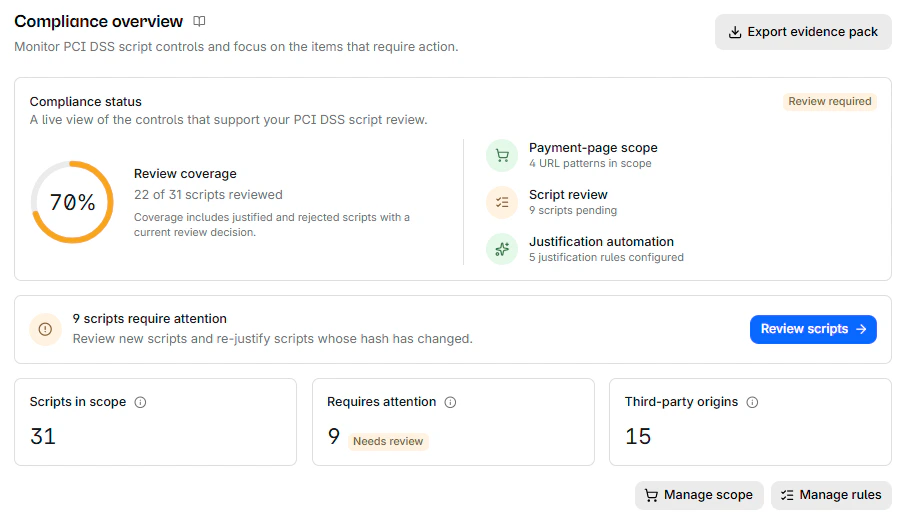
CentralCSP builds the 6.4.3 inventory from those reports, with nothing added to the checkout page. You define your payment pages by URL pattern, and every script observed there enters a review queue. Each script gets a decision, justified or rejected, with required written text, your name, the date, and the hash it applied to, stored in an append-only ledger. When a justified script's content changes, it goes back to Needs review instead of staying approved. Inventory rules approve vetted providers by URL pattern, and scripts injected by browser extensions are filtered out before they reach the inventory.
When your assessor asks, the evidence export produces a ZIP with a PDF report and two complete CSVs: the full inventory and the change ledger. Data is hosted in France, on OVH.
CentralCSP helps you meet 6.4.3; it does not certify compliance, and your QSA decides whether the evidence is sufficient. See how it works on the PCI DSS page, or follow the PCI DSS get-started guide.
Frequently asked questions
Is a CSP enough to meet 6.4.3?
No. A CSP is a legitimate authorization method and supports integrity, but 6.4.3 also asks for a written inventory with a justification for every script, which is a record, not a header. The PCI SSC supplement says entities "will need to incorporate complementary processes" alongside CSP.
Does 6.4.3 apply if I use Stripe or Adyen hosted fields?
To your page, yes. The scripts inside the provider's iframes are the provider's responsibility, but the scripts on the page that embeds them are yours. If you file SAQ A, the eligibility criterion asks you to confirm that page is not susceptible to script attacks.
Can the justification be automated?
The standard does not say whether authorization is manual or automated. A rule that approves a vetted provider by URL is still a written, attributable decision. What an assessor will look for is that a person defined the rule, that it is narrow, and that a changed script comes back for review rather than staying approved.
Sources
- PCI SSC, Payment Page Security and Preventing E-Skimming, Guidance for PCI DSS Requirements 6.4.3 and 11.6.1 (March 2025), announcement
- PCI SSC, FAQ 1588, How does an e-commerce merchant meet the SAQ A eligibility criteria for scripts?
- PCI SSC, document library (PCI DSS v4.0.1, SAQ A)
- Stripe, Integration security guide
- Adyen, Script security for ecommerce
- W3C, Content Security Policy Level 3
- WebKit, WebKit features in Safari 18.4 (Security)