

Review table
The Permissions-Policy builder review table decides which features your pages and frames may use. Columns, flags, defaults, filters, and details.
Last update:
The review table on the Review features step of the Permissions-Policy builder lists every feature your policy could grant, and who it could grant it to. Each row carries a decision, Add or Reject. The header on the deploy step grants only added rows, and writes every other feature as ().
Columns
The table groups its rows under one heading per feature. Each row is one requester of that feature: your own pages, a frame origin, or *. It has these columns:
| Column | Meaning |
|---|---|
| Feature | The feature name, such as camera or payment, as the group heading. Denied next to it means nothing is granted, so the header writes the feature as () |
| Granted to | self for your own pages (labeled your pages), an origin for a frame, or * for every origin |
| Source | Where the row comes from, as listed in Value sources |
| Flags | From frame, Noise, or Third-party script, as listed in Flags |
| Reports | How many reports named this feature and requester in the period, empty for rows with no report |
| Decision | Add to grant the feature to the requester, or Reject to leave it out |
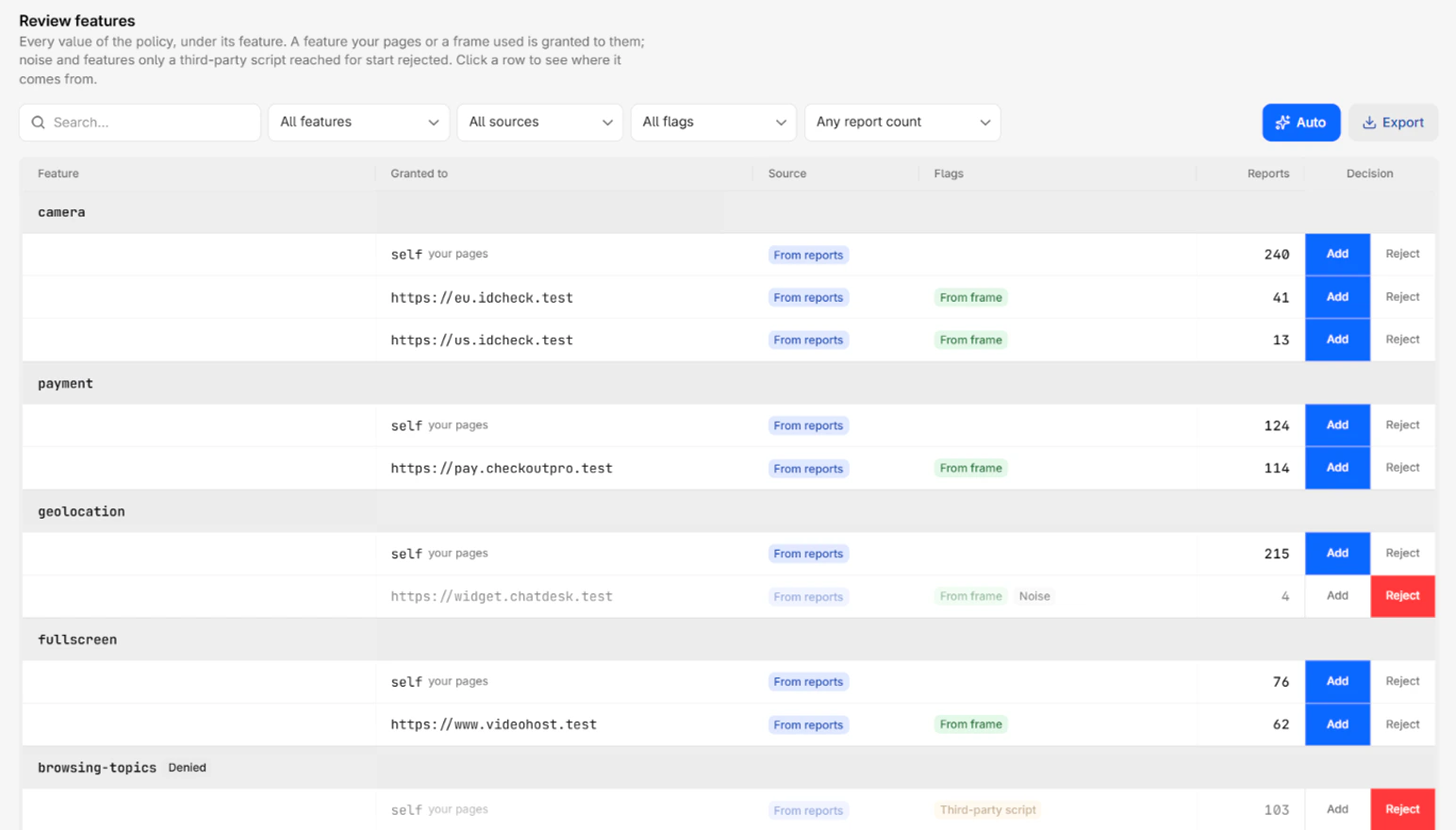
Every feature of the catalog has a group, and so does every feature your starting policy sets or browsers reported. Each group always holds a self row, even when nothing was reported, so you can grant a feature to your own pages by hand. For the list of features, refer to Feature catalog.
Rejected rows stay in the table, dimmed, so you can add them back.
The table opens with the most reported feature first, then the catalog order. Within a feature, self comes first, then each frame origin by report count. To sort by Reports or Decision, select the column header. Sorting orders the groups by their total, then the rows inside each group, and a row never leaves its feature.
Value sources
The Source column shows one of three labels:
| Label | Meaning |
|---|---|
| From reports | Browsers reported this requester using or asking for the feature in the period |
| From your policy | Set by the policy you pasted, when you started from Your own policy |
| Preset | Set by the preset you started from |
A row that browsers reported always shows From reports, even when your starting policy also grants it.
Flags
The Flags column shows why a row deserves a second look:
| Flag | Meaning |
|---|---|
| From frame | The row grants the feature to another origin, usually an embedded frame, rather than to your own pages |
| Noise | Fewer than 10 reports in the period, or every call came from a browser extension. Starts rejected |
| Third-party script | On your own pages, every script that called the feature came from another origin or a browser extension. Granting it to self would hand the feature to that script too. Starts rejected |
For how each flag is decided, refer to Builder decision rules.
Default decisions
The builder decides every row before you touch it:
- A requester your starting policy or preset grants starts added, whatever the reports say.
- A reported
selfrow starts added, because your pages used the feature. - A reported frame origin starts added, because the frame asked for the feature in its
allowattribute. - A row flagged Noise or Third-party script starts rejected, unless your starting policy grants it.
- Every other row starts rejected, so a feature nobody used stays denied.
Your own decisions always win over these defaults. They also survive a change of period on the first step, so you can widen the period without losing your work.
When your starting policy grants a feature to *, the wildcard covers every origin. Adding an origin changes nothing, and rejecting one does not remove it. To narrow the feature, reject the * row, then add the origins that need it.
Filters
The toolbar narrows the table with a search field and four filters:
- The search field matches the feature and the requester.
- All features shows one feature.
- All sources shows one value source.
- All flags shows one flag.
- Any report count shows rows with at least, or fewer than, 10, 100, or 1,000 reports, such as Only 10+ reports or Only under 100 reports. A row with no report never matches a count.
The feature, source, and flag filters offer only the options the table holds.
Auto
The Auto button puts every row back to its default decision. The builder grants what your pages and frames used, rejects noise and third-party-only features, and puts back every grant of the starting policy. A notification, Values decided automatically, says how many rows were granted and rejected.
Export
The Export button, next to Auto, downloads the rows the filters keep as a CSV file named centralcsp-permissions-policy-values-<website>-<date>.csv, in table order. The file has the Feature, Granted to, Source, Flags, Reports, and Decision columns (Added or Rejected). Each export is recorded in the audit log as permissions_policy_values.exported, with the row count and the active filters.
Details panel
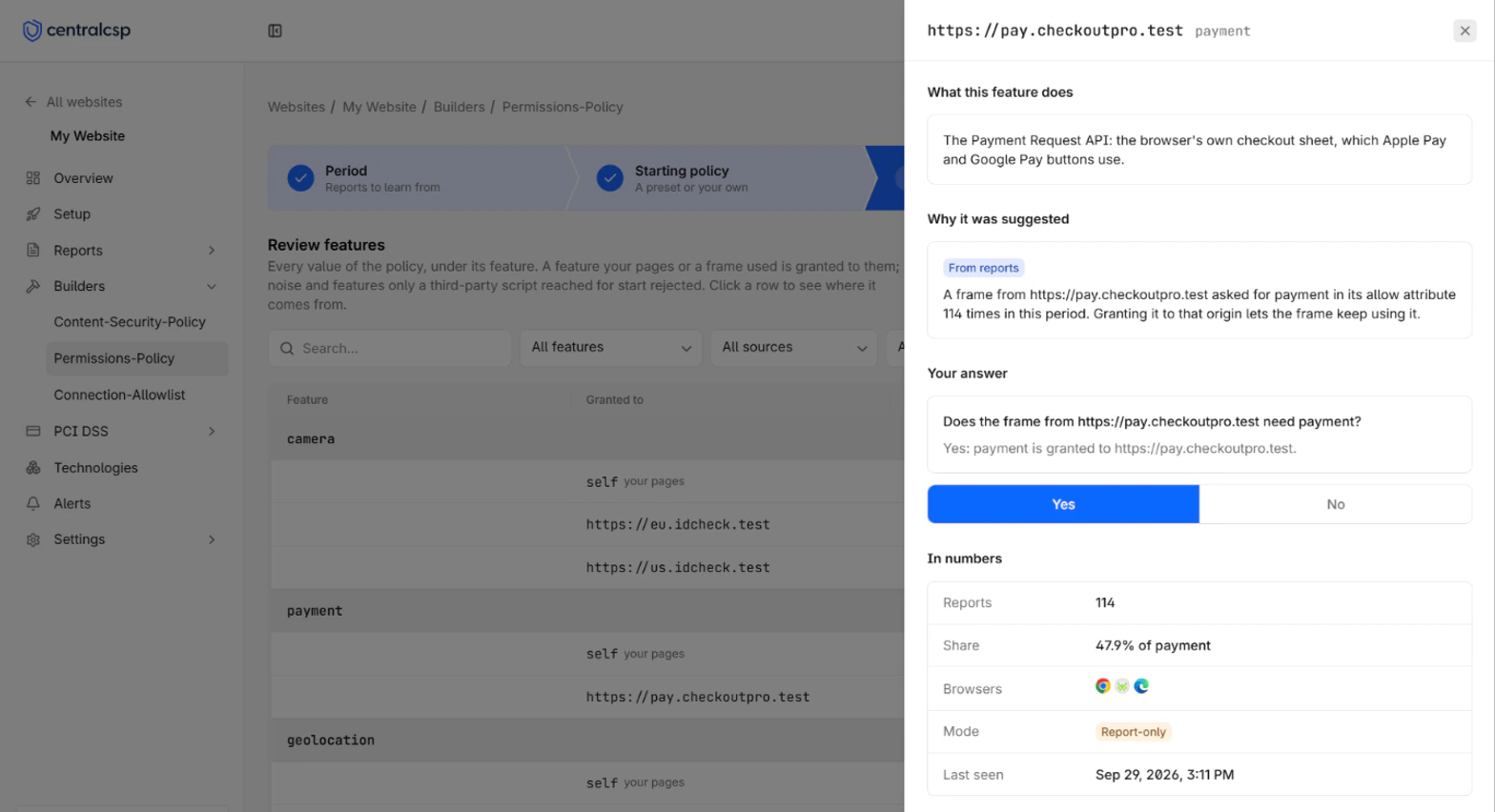
Selecting a row opens its details panel. The heading is the requester, with the feature under it. The panel gathers the evidence behind the row, so you can decide whether your pages or that frame really need the feature. It holds these sections:
| Section | What it shows | What it tells you |
|---|---|---|
| Why it looks like noise | Why the row was flagged as noise, one line per signal | Whether the calls come from a visitor's machine rather than your site |
| What this feature does | What the feature lets a page do | How much the grant opens up, for example that clipboard-read reads what the visitor copied |
| Why it was suggested | For a reported row, how many times your pages used the feature or a frame asked for it, and what granting it does | Whether the use is your own, a frame's, or only a third-party script's |
| Why it is here | For a row with no report, what the preset or your policy says about it | That the row comes from the starting policy, not from a report |
| Your answer | A yes or no question, such as Does the frame from https://pay.example.com need payment?, with what the current answer does to the header | Yes grants the feature and No denies it, the same as the Decision column |
| In numbers | Reports, Share of the feature's reports, Browsers, Mode, and Last seen | Whether the use is steady traffic or a one-off |
| Top 10 pages where it happened | The ten pages that triggered the most reports | Whether the feature is used on pages you know, such as your checkout |
| Scripts that used it | The script file, line, and column behind each call from your pages | Whether the code is yours, a vendor's, or something you do not recognize |
| Frames that asked for it | The src and allow attributes of each iframe that asked for the feature | Which embed asked, and for exactly which features |
On a very busy period, the page list can be replaced by This period holds too many reports to rank its pages. Pick a shorter period to see them.
Decide whether to grant a feature
Grant a feature when your pages or a frame you embed on purpose need it. Reject it when nothing you control needs it, or when you do not know who asked for it. A rejected feature is blocked once you enforce the policy, so rejecting one your pages need breaks them. Rejecting a feature an unknown script or frame reached for is how the policy protects your visitors.
Grant the feature in cases like these:
| Row | Evidence in the details panel | Decision |
|---|---|---|
self in payment | Hundreds of reports on your checkout pages, from a script on your own origin | Add, your checkout uses the browser's payment sheet |
https://pay.example.com in payment | Frames that asked for it lists your payment provider's iframe with allow="payment" | Add, and keep the allow attribute on the iframe |
self in clipboard-write | Scripts that used it points at your own bundle, on pages with a Copy button | Add, the button writes to the clipboard |
https://video.example.com in fullscreen | Your embedded video player, on every product page | Add, visitors expand the video |
self in camera | Reported only on your identity check page, every day of the period | Add, the page takes a photo of an ID |
Reject the feature in cases like these:
| Row | Evidence in the details panel | Decision |
|---|---|---|
self in browsing-topics | Flagged Third-party script, every call from an ad network's script | Reject, granting it hands the visitor's inferred interests to that script |
https://widget.example.net in geolocation | Flagged Noise, 4 reports from a chat widget | Reject, unless the widget really needs the visitor's location |
An origin you do not recognize in camera | Frames that asked for it shows an iframe you did not add | Reject, then investigate it as a possible injection |
self in usb | Flagged Noise, every call from a browser extension | Reject, the extension runs on the visitor's machine, not your site |
* in fullscreen, from your pasted policy | No report, the wildcard grants every origin | Reject, then add self and the frame origins that need it |
Do not grant a feature only to silence a report. The report was the only sign that something on your pages asked for the feature at all.
Notes
The builder does not grade the policy. A grant to self or to a named origin is the safe shape, and * is the one value to avoid, because it hands the feature to every frame you embed. For the risks of each allowlist, refer to the Permissions-Policy reference.
Next steps
Get started
Build a Permissions-Policy from your reports. Pick a period and a preset, grant each feature to your pages and frames, then deploy in report-only mode.
Builder decision rules
The rules the Permissions-Policy builder follows to turn feature reports into grants, flag noise and third-party scripts, and write the header value.