

Policy builders, write security headers from browser reports
The CSP, Permissions-Policy, and Connection-Allowlist builders turn the reports browsers send into headers you review, then deploy in report-only mode.
Last update:
A builder writes a security header from the reports your website already collects. Instead of guessing what your pages need, you start from what real browsers reported, decide each value, and copy headers ready to deploy.
CentralCSP has three builders, one per policy:
| Builder | Header it writes | Learns from | Starts from |
|---|---|---|---|
| Content-Security-Policy | Content-Security-Policy | CSP violation reports | The policy your site serves, as detected in the reports, or the CentralCSP baseline |
| Permissions-Policy | Permissions-Policy | Permissions-Policy violation reports | A preset, or a policy you paste |
| Connection-Allowlist | Connection-Allowlist | Connection-Allowlist reports | Your own origin only, or a list you paste |
The builders live under each website, in the sidebar, as Builders. Every website role can use them. The Permissions-Policy and Connection-Allowlist builders work on every plan. The CSP builder needs a plan that collects CSP violation reports.
Deploy in report-only first
Every builder keeps what your pages use today by default, including values you may not recognize. Review the values, then deploy the report-only version of the header. Switch to the enforced header only once a week or more of reports shows that nothing your pages need would be blocked.
How a builder works
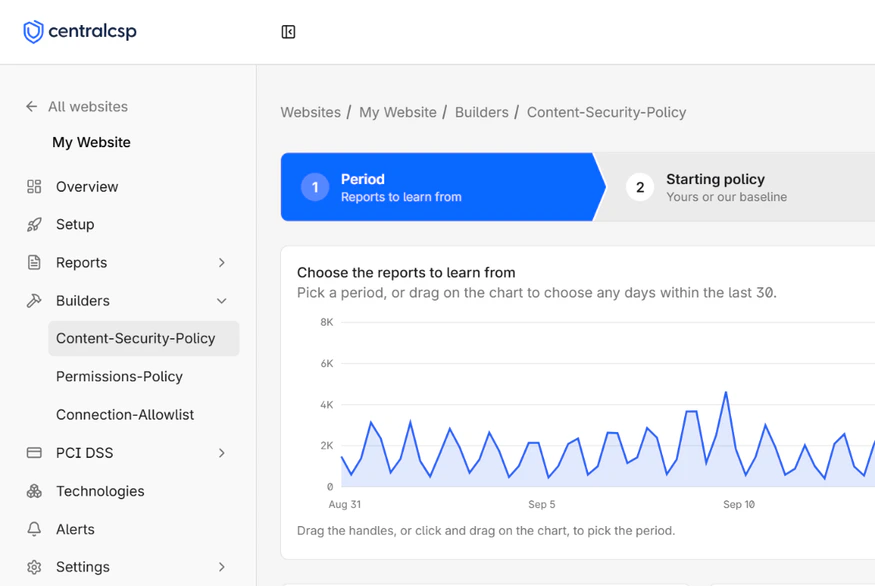
The three builders share one four-step wizard:
- Period: Choose which days of reports to learn from, up to the last 30. The counters show how many reports, values, and likely noise the period holds.
- Starting policy: Pick what the policy starts from before any report is added.
- Review: Add or reject each value in a table. Every value starts decided, and noise starts rejected.
- Deploy: Pick Report-only or Enforce, then copy the headers or select Export as TXT.
Every step stays clickable, so you can go back and change the period or the starting policy. From the second step, Start over clears your work and returns to the first step.
A builder saves nothing and deploys nothing. The step, the period, and the starting policy stay in the page address, but your add and reject decisions live only in the open page. Keep the tab open until you export.
The period
The Period step offers Today, 7 days, 14 days, and 30 days, and you can drag across the report chart for any other range within the last 30 days. The default is 7 days. Today is the current calendar day in your timezone.
A website that sends a very large volume of reports is limited to 7 days at a time, and the 14 days and 30 days options are hidden. If a period holds more reports than the builder can read in time, the page asks you to pick a shorter period.
A longer period catches pages few visitors open, such as checkout or account settings. A shorter one reflects a recent change to your site.
The review table
Each builder lists the values its policy could hold, one row per value, grouped by directive, feature, or site. The Source column says where a value comes from, Flags marks what needs attention, and Reports counts how often browsers reported it. The Decision column holds Add or Reject.
The same tools work in every builder:
- A search field and filters, including a report count filter.
- Auto, which puts every row back to the builder's recommendation.
- Export, which downloads the rows the filters keep as a CSV file.
- A details panel for each row, with why the value was suggested, its numbers, the pages where it happened, and why it looks like noise when it does.
Your own decisions win over the defaults, and they survive a change of period.
Noise
Noise is a reported value your pages do not need. The usual cause is software on the visitor's machine, such as a browser extension or an antivirus, that acts on every page it opens. Allowing it widens the policy for nothing, so noise starts rejected. To drop extension reports before they are stored, refer to Drop reports from browser extensions.
Each builder flags noise with its own rules, described on its decision rules page. Noise is only a default. A page few people open can look like noise and still be real, so check the noise rows before you deploy.
Deploy the headers
The last step writes two response headers. A Reporting-Endpoints header declares your website's CentralCSP endpoint, and the policy header follows, in its report-only form until you select Enforce:
Reporting-Endpoints: centralcsp="https://MyEndpoint.report.centralcsp.com", default="https://MyEndpoint.report.centralcsp.com"Permissions-Policy-Report-Only: camera=(), microphone=(), geolocation=(), payment=(self)Add both headers to every HTML response. Export as TXT downloads them in a text file, and each export, TXT or CSV, is recorded in the audit log.
Use the builders from the API and the MCP server
Each builder has a REST API endpoint that returns the recommended policy with no review, and a matching tool on the Model Context Protocol (MCP) server:
| Builder | API endpoint | MCP tool |
|---|---|---|
| Content-Security-Policy | Build a recommended CSP | build_recommended_csp |
| Permissions-Policy | Build a recommended Permissions-Policy | build_recommended_permissions_policy |
| Connection-Allowlist | Build a recommended Connection-Allowlist | build_recommended_connection_allowlist |
They apply the same defaults as the dashboard, so review their output the same way. Refer to the API reference.
Next steps
Overview
Policy builders, PCI DSS script controls, the script inventory built from hash reports, the Technologies SBOM with CVE detection, and alerting on what changes.
Overview
The CSP builder writes a Content Security Policy for your website from the CSP violation reports browsers sent, then grades it before you deploy it.