

Rules
Pick an event, pick channels, set a cooldown. The 18 events available, how to tune a spike rule, and how to set the PCI and technology rules.
Last update:
A rule watches one event and notifies one or more channels when it fires.
Adding a rule requires the website Manager role, and at least one channel.
Add a rule
Alerts > Configuration > Add rule.
| Field | Notes |
|---|---|
| Name | What the notification is called |
| Event | Grouped by surface. Cannot be changed after creation |
| Channels | One or more, up to 20. Required |
| Cooldown (minutes) | Default 15. Minimum time between notifications |
| Spike multiplier | Spike events only. Default 3 |
| Minimum reports per hour | Spike events only. Default 50 |
| Minimum severity | New vulnerability only. Default Medium |
| Statuses | Outdated or deprecated version only. Outdated, Dormant, and Deprecated selected by default |
To change which event a rule watches, create a new rule and delete the old one.
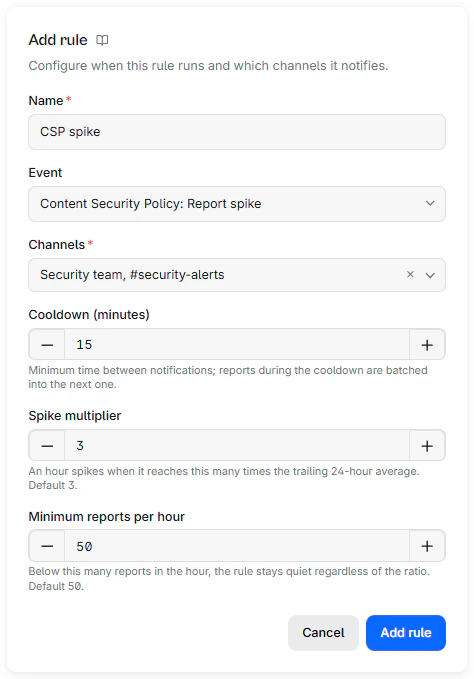
A spike event adds the multiplier and the floor to the dialog:
The 18 events
The events are grouped by the surface they watch:
| Surface | Events |
|---|---|
| Content Security Policy | New violation type, Report spike |
| Script hashes | New script origin |
| Subresource Integrity | Report spike |
| PCI compliance | New unjustified script, Unjustified script change |
| Technologies | New vulnerability, Outdated or deprecated version, New technology |
| Network errors | New failing origin, Report spike |
| Crashes | Report spike |
| COOP | New violation type |
| COEP | New violation type |
| Permissions Policy | New violation |
| Connection allowlist | New blocked origin |
| Deprecations | New deprecated API usage |
| Interventions | New browser intervention |
"New" events fire the first time something is observed. Because reports are kept for 90 days, something that goes quiet for a quarter and returns is treated as new again.
The two PCI compliance events read the script inventory of your payment pages. Refer to The PCI compliance events.
The three Technologies events read the Technologies inventory rather than raw reports, so they need a plan that includes it. Refer to Tune a technology rule.
Cooldown
Cooldown is the minimum gap between notifications for a rule, entered in minutes and defaulting to 15.
It does not drop anything. Findings during the cooldown are batched into the notifications sent when it ends. Each notification lists up to 10 findings, and a rule sends at most 5 per cooldown, the last one counting the findings past them. A burst produces a few grouped messages rather than 50.
Set it against how you consume alerts. 15 minutes suits a chat channel. For a rule that pages someone, set a longer cooldown. The maximum is 24 hours. A value above 1,440 minutes is rejected.
Tune a spike rule
Spike rules compare the last completed hour against the average of the previous 24 hours. Two settings control them, and both matter.
Spike multiplier is how many times the trailing average the hour must reach. Default 3, range 1.5 to 100.
Minimum reports per hour is a floor. Below it the rule stays quiet no matter the ratio. Default 50, range 1 to 1,000,000.
The floor is what stops the false alarms
On a low-volume site the multiplier alone is useless: going from two reports an hour to eight is a 4x spike and means nothing. The floor is what makes spike rules usable. Set it above your normal hourly volume, not below it.
A rule left on both defaults follows any future change to the defaults. Setting them explicitly pins your values.
Wait until you know a site's normal volume before adding spike rules. Created on day one, the 24-hour baseline is still forming and the rule fires on the ramp-up.
The PCI compliance events
Both events watch the scripts on the pages that match your payment-page patterns, and both fire only for a script that nobody has justified, by hand or through an inventory rule. A script a rule justifies or excludes on arrival never triggers them.
- New unjustified script fires when a script appears on a payment page for the first time and waits for a justification. PCI DSS 6.4.3 requires every payment-page script to be authorized and justified.
- Unjustified script change fires when a script on a payment page serves different content that nobody has justified yet, including a script justified earlier at its previous content. The notification shows the content hash that was reviewed and the one served now. PCI DSS 11.6.1 asks you to detect and review such changes.
Each finding links to the script in the script inventory, where you justify it or remove it.
Tune a technology rule
The three Technologies events watch the library inventory built from hash reports. Both fire on a change to the inventory, never on what was already there when the rule was created, so review the current inventory first. Refer to Get started with Technologies.
New vulnerability fires when an advisory is published for a library version already on the site, and when a version with a known vulnerability is detected for the first time. The one setting is Minimum severity: findings below it stay quiet. The default is Medium. Set it to High or Critical for a channel that pages someone, and leave it at Medium for a chat channel. Low includes advisories with a Low band; advisories with no severity assigned never fire.
The notification names the library and version, lists each advisory with its severity, the version that fixes it, and a link to its public page, and gives the recommended upgrade. When no maintained release of the library exists, it says to find an alternative instead.
Outdated or deprecated version fires when a technology is detected with, or moves to, one of the selected statuses. The rule has four switches, one per version status: Outdated, Superseded, Dormant, and Deprecated. At least one must stay on.
Superseded is off by default. It flags a version on an older major line than the one the library still releases, for example Swiper 9 when Swiper 14 is current. Those versions showed as Unknown before the status existed and move to Superseded as they are re-checked, so a default that included it would notify every existing rule at once. Turn it on when major-line upgrades belong in the same channel as the others.
A Deprecated-only rule is the low-noise option: it fires rarely and each finding calls for a move to a maintained line, or a replacement when the library has none.
New technology fires when the website starts loading a library, or a version of one, that it did not load before. It has no setting. Use it to follow what a deployment or a vendor tag brings in, vulnerable or not.
The three rules batch like every other rule, so a deployment that brings in several outdated libraries produces grouped notifications after the cooldown rather than one per library.
A rule set that works
For most sites, five rules:
| Event | Channel | Cooldown |
|---|---|---|
| CSP, New violation type | Chat | 15 min |
| PCI compliance, New unjustified script | Chat plus email to the compliance owner | 60 min |
| PCI compliance, Unjustified script change | Chat plus email to the compliance owner | 60 min |
| Script hashes, New script origin | Chat | 60 min |
| Technologies, New vulnerability | Chat plus email to whoever patches | 60 min |
Add spike rules after a couple of weeks, once the numbers mean something.
Rule state and deletion
The Enabled switch stops a rule without losing its configuration. Useful during a migration that will generate noise you already understand.
Deleting a rule discards anything pending for it.