

Technologies, a client-side SBOM with CVE detection
Technologies lists every JavaScript library your visitors load, with version, lifecycle status, and known CVEs, from CSP hash reports. No agent, no crawler.
Last update:
Technologies lists every JavaScript library your visitors' browsers load on a website. Each library carries its version, whether that version is still current, and the Common Vulnerabilities and Exposures (CVE) entries that affect it. It is a client-side software bill of materials (SBOM): the list of libraries and versions that actually execute in your visitors' browsers, built from what real browsers report rather than from the packages in your build.
The page lives under each website as Technologies. Every website role can read it.
Technologies depends on your plan. On plans without it, the sidebar entry is disabled. Compare plans on the pricing page or under Settings > Billing.
What it answers
Open the page when you need one of these answers:
- Which libraries run on this site, and which version of each.
- Which of them ship a known vulnerability, and how severe it is.
- Which version to upgrade each one to, or whether to replace it.
- Which are outdated, on an older major line, dormant, or no longer maintained.
- Which script files carry each library, and from which URL.
- When a library appeared, changed status, or gained a new advisory.
The Get started page takes you from an empty page to a reviewed inventory with alerts.
Where the data comes from
Browsers report a hash of every script they execute when your Content Security Policy (CSP) carries 'report-sha256'. For each reported script, the CentralCSP engine identifies the technology, its version, its lifecycle status, and the known CVEs that affect it. To check a single public page without an account, use the free Technology Checker.
The inventory is what browsers loaded, so it includes third-party tags, CDN copies, and scripts injected by a tag manager that a source-tree scan never lists. Two things follow from that, and one limit:
- A library appears a short while after its script is first reported. There is no crawler to schedule, no agent to install, and no repository to connect.
- CentralCSP re-checks known technologies regularly, so a newly published advisory or a status change shows up on its own.
- Only scripts loaded from a URL are analyzed. Inline scripts are not part of the inventory.
The same csp-hash reports feed the CSP hashes page and the PCI DSS (Payment Card Industry Data Security Standard) review queue, the two halves of the script inventory. Technologies adds the library, version, and vulnerability layer on top.
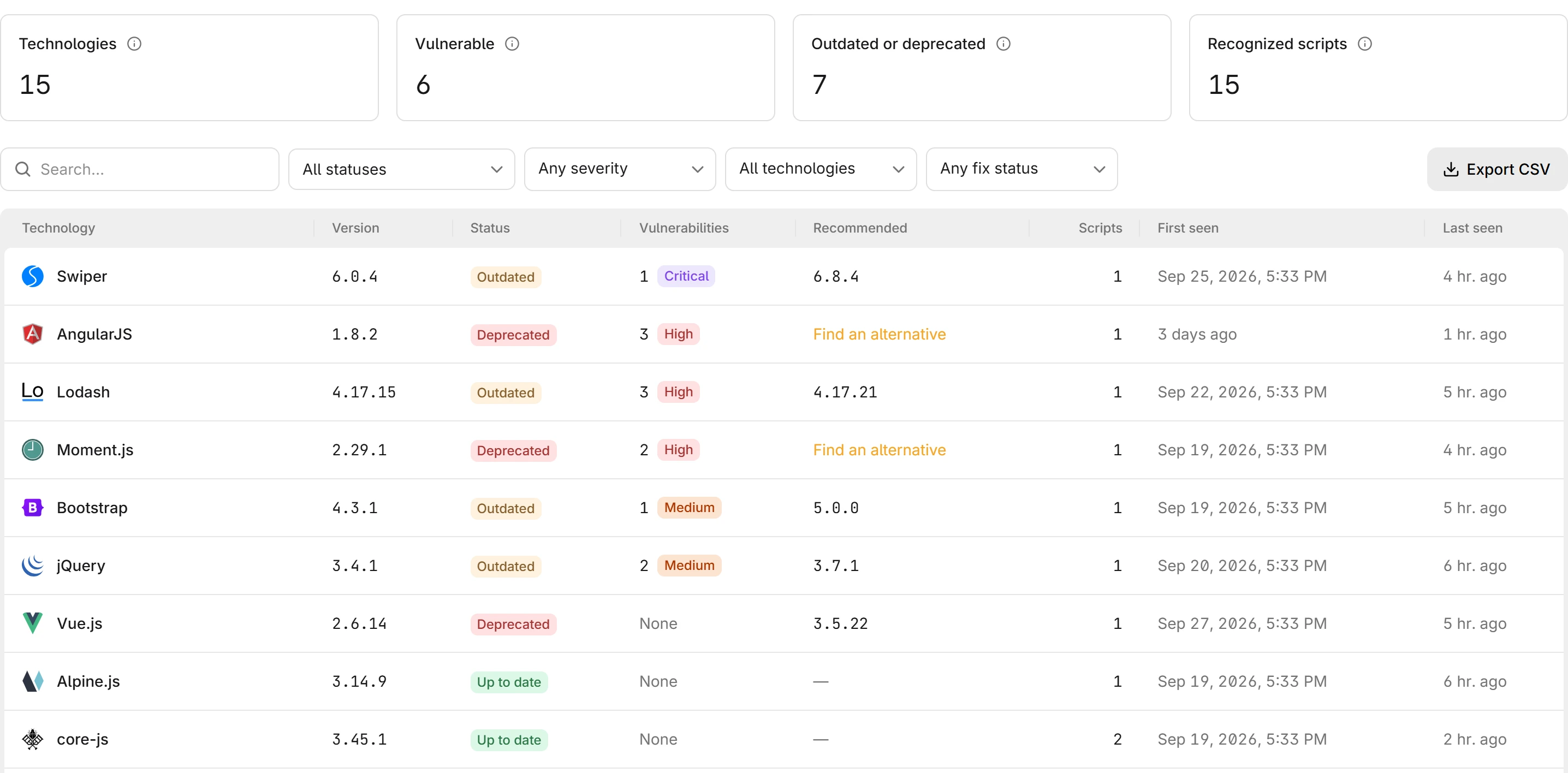
What a row holds
The inventory has one row per library version, so two versions of the same library are two rows. Each row has these columns:
| Column | Meaning |
|---|---|
| Technology | The name and icon of the library |
| Version | The version the engine identified, or Unknown when only the library was recognized |
| Status | Where that version sits in the lifecycle of the library |
| Vulnerabilities | How many advisories affect this version, with the highest severity among them, or None |
| Recommended | The version to upgrade to, Find an alternative when no maintained release exists, or a dash when nothing is recommended |
| Scripts | How many distinct script files on the site carry this version |
| First seen | When a script carrying this version was first reported |
| Last seen | When one was last reported |
The status values are described in Version statuses, and the recommendation in Recommended upgrade.
The table lists the vulnerable versions first, most severe first, then the others from the most urgent status to up to date, and the versions it could not identify last.
The four summary cards summarize the table: technologies detected, technologies with at least one known vulnerability, technologies that are outdated, superseded, or deprecated, and the number of distinct scripts matched to a library.
Selecting a row opens the technology drawer with its advisories, its scripts, and its history. Refer to Review a technology.
Version statuses
Every row carries one lifecycle status. The status describes the version you run, not the library as a whole. Each status means the following:
| Status | Meaning | What to do |
|---|---|---|
| Up to date | The version is the current release | Nothing |
| Outdated | A newer release exists in the same major line | Plan the upgrade, sooner if the row is also vulnerable |
| Superseded | The version is on an older major line than the one the library still releases | Plan the move to the current major line |
| Dormant | The library has not published a release for a long time | Check whether it is still maintained before you depend on it |
| Deprecated | The line of this version is no longer maintained and gets no security fixes | Move to a maintained line, or replace the library when it has none |
| Unknown | The library was recognized, the version was not | Check the script yourself |
A deprecated version gets no fix for its next advisory. When the library still maintains a newer line, the recommended upgrade points to it. When no line is maintained anymore, the recommendation is to find an alternative. An unknown version cannot be matched against advisories, because vulnerability matching needs a version to compare.
An older major line usually stops receiving fixes before the current one, and the gap to it grows with every release. Moving to the current line is a major upgrade, so read the release notes of the library for breaking changes first.
The Outdated or deprecated card counts the three statuses that call for action: Outdated, Superseded, and Deprecated. Dormant is a warning sign rather than a finding, and Unknown means the analysis could not go further.
Recommended upgrade
For each version, CentralCSP recommends the release to move to, checked against every known advisory of the library, so it never points at a release another advisory still affects. The drawer says why that release was picked:
| Reason | Meaning |
|---|---|
| Fixes every known vulnerability | The first release that no known advisory affects |
| Latest release of this line | The newest release of the major line you run |
| Latest release of the latest line | The newest release of the line the library still maintains, for a version on an older or retired line |
| Latest release | The newest release known, when the version matches no line |
| No maintained release | No line of the library is maintained anymore, so no upgrade fixes it. The recommendation is Find an alternative |
The drawer also shows the latest release of your line and of the latest line, and warns when the latest line starts a new major version, so you can read its breaking changes before upgrading. Nothing is recommended for a version that is already the latest release.
Severity
Each advisory carries a severity band: Low, Medium, High, or Critical. The severity of a technology is the highest among the advisories that affect its version, and the table sorts by it, so the row that matters most is the first one.
An advisory with no severity assigned still counts as a vulnerability. It shows as No severity in the drawer and does not raise the severity of the row.
How long a technology stays listed
A technology stays in the inventory as long as browsers keep reporting a script that carries it. When no script carrying a version has been reported for seven days, the version leaves the inventory. Its history stays, so a library that returns after a deployment rollback is listed as detected again with its earlier entries still attached.
The daily analysis cap
Each website can send a limited number of new, never-seen scripts for analysis per day. A site that serves thousands of distinct script files in one day, for example a build that gives every user a unique bundle URL, hits that cap. The page then shows Inventory paused for today. Libraries already recognized keep being tracked. Scripts over the cap are analyzed the next day.
If the banner appears every day, the script URLs of the site change on every request. Stabilize the URLs, or accept that the inventory covers the stable subset.
Use it from the API and MCP
Everything on the page is available on the REST API under the technologies resource of the website: the list with the same filters, the summary counters, the CSV export, one technology with its advisories, recommended upgrade, and scripts, its history, and the technologies a given script carries. Refer to the API reference.
The Model Context Protocol (MCP) server exposes the list as the read-only list_technologies tool and one technology as get_technology, so an AI client can answer "which libraries on this site have a critical CVE, and what do I upgrade them to" from the same data.
Next steps
Script inventory
Every script real browsers load on your site, first party and third party, grouped by origin, with hash history and the library behind each one.
Get started
Go from an empty Technologies page to a reviewed client-side SBOM with alerts. Confirm hash reporting, review the vulnerable rows, then add the two rules.