CSP for Google Analytics and Tag Manager with a nonce

Co-founder, CentralCSP ·
Last update:
You can run Google Analytics 4 (GA4) and Google Tag Manager (GTM) under a strict Content Security Policy (CSP) without weakening it. A CSP is an HTTP response header that tells the browser which scripts and other resources a page may load and run. The strict way to allow GTM is a nonce on the GTM bootstrap script plus 'strict-dynamic', not a list of Google domains in your script directive.
The common mistake is to allowlist googletagmanager.com and google-analytics.com in script-src. With a nonce and 'strict-dynamic' in place, the browser ignores host allowlists for scripts entirely, so those entries do nothing. This post shows the approach that actually works, where the Google domains really belong, and a full example header you can adapt.
New to nonces? How to build a strong CSP covers what a nonce is, how to generate one, and the Report-Only-first workflow this post assumes. Using Fonts, Maps, reCAPTCHA or YouTube as well? Their hosts are in other Google services under the same policy below.
The key point, do not list Google hosts in script-src
When script-src contains a nonce and 'strict-dynamic', the browser changes how it decides which scripts may run. It ignores host allowlists, 'self', and scheme sources for scripts. It trusts only scripts that carry the matching nonce, and any scripts those trusted scripts load.
So script-src https://www.googletagmanager.com https://www.google-analytics.com does nothing useful here. The browser silently ignores it. Adding those hosts does not make GTM work and it does not make GTM fail, it is just dead weight that hides the real mechanism.
The mechanism that does work: put the nonce on the inline GTM bootstrap script. That script is trusted because it carries the nonce. 'strict-dynamic' then propagates that trust to gtm.js, which GTM loads, and onward to every tag GTM injects. No Google domain appears in script-src at all. That propagation is also why GTM is worth watching closely; see how attackers abuse Google Tag Manager.
The GTM nonce bootstrap
Google's official GTM snippet already propagates the nonce to the gtm.js request. Use this version, where the nonce on the inline script is read and copied onto the injected script tag:
<script nonce="{SERVER-GENERATED-NONCE}">(function(w,d,s,l,i){w[l]=w[l]||[];
w[l].push({'gtm.start': new Date().getTime(),event:'gtm.js'});
var f=d.getElementsByTagName(s)[0], j=d.createElement(s),
dl=l!='dataLayer'?'&l='+l:'';j.async=true;j.src=
'https://www.googletagmanager.com/gtm.js?id='+i+dl;
var n=d.querySelector('[nonce]');
n&&j.setAttribute('nonce',n.nonce||n.getAttribute('nonce'));
f.parentNode.insertBefore(j,f);
})(window,document,'script','dataLayer','GTM-XXXXXX');</script>
Two details make this strict-CSP-safe:
- The
nonce="{SERVER-GENERATED-NONCE}"attribute is what lets'strict-dynamic'trust this inline script. Replace{SERVER-GENERATED-NONCE}with a fresh, per-response, base64 random value of at least 128 bits, the same value you put in the CSP header. - The lines that read
[nonce]and callj.setAttribute('nonce', ...)copy the nonce onto the injectedgtm.jsscript. With'strict-dynamic'this propagation is not strictly required for scripts GTM loads, but it keeps the nonce flowing for tags that check for it, so keep it.
Generate the nonce on the server and never reuse it across responses. The basics of nonce generation are in how to build a strong CSP, so this post does not repeat them. On Next.js, the per-request nonce comes from the proxy and Next applies it to the scripts it renders; see how to set up a CSP nonce in Next.js for that wiring, then put the same nonce on the GTM bootstrap below. For the GTM-specific walkthrough, see GTM under a strict CSP in Next.js.
Where the Google domains belong
'strict-dynamic' only affects scripts. GA4 and GTM also make non-script requests: collection beacons, image pixels and, once Google Ads features are on, a frame. Those are governed by other directives, and they still need the Google hosts listed. This is where the domains go, following Google's Tag Manager CSP guide as of November 2026.
connect-srccovers thefetchand beacon calls GA4 uses to send data. Google's current list ishttps://www.googletagmanager.com https://*.google-analytics.com https://*.google.com. The wildcards matter because GA4 sends to regional collection endpoints likeregion1.google-analytics.com. A barewww.google-analytics.comblocks that regional traffic.img-srccovers pixel and image requests:https://www.googletagmanager.com https://*.google-analytics.com.frame-srchttps://www.googletagmanager.comis only in Google's list once Google Ads features (Google signals, remarketing, conversions) are on. Those features also addhttps://*.google.<TLD>(your country domain, such asgoogle.fr) andhttps://*.g.doubleclick.nettoimg-srcandconnect-src, andhttps://pagead2.googlesyndication.comtoconnect-src.
GTM Preview mode has its own list in Google's guide: https://www.googletagmanager.com https://tagmanager.google.com https://fonts.googleapis.com in style-src, https://www.googletagmanager.com https://ssl.gstatic.com https://www.gstatic.com in img-src, and https://fonts.gstatic.com data: in font-src. Its scripts load from gtm.js, so 'strict-dynamic' already covers them.
GTM Preview mode and some tags inject inline styles. If you see style-src violations, prefer a style nonce or specific hashes over reopening the policy with 'unsafe-inline'. Which styles a container injects is tag-dependent, so test it against your own container in Report-Only.
Advertising and conversion tags (Google Ads, DoubleClick, Floodlight) reach additional hosts. Add only the hosts the tags your container actually fires need, rather than allowlisting the full set up front. Report-Only will tell you exactly which ones. For the host lists other Google products need, see other Google services under the same policy.
A full example header
Here is a strict policy that runs GA4 and GTM. Note that script-src carries only the nonce and 'strict-dynamic', with no Google hosts:
Content-Security-Policy:
  script-src 'nonce-{SERVER-GENERATED-NONCE}' 'strict-dynamic';
  connect-src 'self' https://www.googletagmanager.com https://*.google-analytics.com https://*.google.com;
  img-src 'self' https://www.googletagmanager.com https://*.google-analytics.com;
  frame-src https://www.googletagmanager.com;
  object-src 'none';
  base-uri 'none';
  report-uri https://<Endpoint-ID>.report.centralcsp.com;
  report-to csp-endpoint
The {SERVER-GENERATED-NONCE} in the header must be the exact same value you put on the inline bootstrap script. The frame-src line is for Google Ads features; drop it if your container does not use them. object-src 'none' and base-uri 'none' are there because a strict policy needs them: base-uri 'none' in particular stops an injected <base> tag from redirecting your nonced script loads. report-uri and report-to send violation reports to your collector so you can watch what the policy would block.
Other Google services under the same policy
GA4 and GTM are rarely the only Google products on a page. Each service below loads from its own hosts and trips a different directive, and the temptation is to widen the whole policy until the breakage stops. Add only what each service needs instead. Two rules from the policy above still hold: under a nonce plus 'strict-dynamic', Google hosts in script-src are ignored, so the service's loader script needs the nonce; and the hosts in the other directives are what actually matter. Google changes hosts over time and your set depends on the features you enable, so treat these lists as a starting point and confirm them in Report-Only.
Google Fonts
Google Fonts loads in two stages: a stylesheet from one host, then the font files it references from another. Miss either and the text falls back to a system font.
Content-Security-Policy:
  style-src 'self' https://fonts.googleapis.com;
  font-src 'self' https://fonts.gstatic.com
Google Maps
Google's Maps JavaScript API CSP guide recommends a strict, nonce-based policy too. Its version, as of November 2026, puts the nonce and 'strict-dynamic' in script-src and lists the Google hosts only in the other directives:
Content-Security-Policy:
  script-src 'nonce-{SERVER-GENERATED-NONCE}' 'strict-dynamic' https: 'unsafe-eval' blob:;
  img-src 'self' https://*.googleapis.com https://*.gstatic.com *.google.com *.googleusercontent.com data:;
  connect-src 'self' https://*.googleapis.com *.google.com https://*.gstatic.com data: blob:;
  font-src https://fonts.gstatic.com;
  style-src 'nonce-{SERVER-GENERATED-NONCE}' https://fonts.googleapis.com;
  frame-src *.google.com;
  worker-src blob:
The https: source is only a fallback for browsers without 'strict-dynamic'. Note the 'unsafe-eval' in Google's list: Maps is one of the cases where the strict pattern still costs you eval, so keep it to the pages that render a map.
reCAPTCHA
reCAPTCHA recommends the nonce-based approach: put your nonce on the api.js script tag and it handles the rest, including under 'strict-dynamic'. If you run an allowlist policy instead, its FAQ scopes the hosts to the /recaptcha/ path:
Content-Security-Policy:
  script-src 'self' https://www.google.com/recaptcha/ https://www.gstatic.com/recaptcha/;
  frame-src https://www.google.com/recaptcha/ https://recaptcha.google.com/recaptcha/;
  connect-src 'self' https://www.google.com/recaptcha/
Where www.google.com is not reachable, Google documents www.recaptcha.net as the alternate host. Switch every www.google.com/recaptcha/ reference at the same time, in the script tag and in each directive, so the script and frame origins stay in sync.
YouTube embeds
An embedded YouTube player runs in an iframe and its poster thumbnails load as images. Google publishes no single CSP page for YouTube, so this is built from its serving domains: the player frame comes from www.youtube.com or www.youtube-nocookie.com (the privacy-enhanced embed host), and thumbnails from i.ytimg.com. Allow the frame host your embed code actually uses.
Content-Security-Policy:
  frame-src https://www.youtube-nocookie.com https://www.youtube.com;
  img-src 'self' https://i.ytimg.com
To see the exact hosts a live page loads, including the third parties your third parties pull in, run it through the CSP scanner and let the Report-Only reports confirm the rest.
Avoid unsafe-eval, prefer Custom Templates
One GTM feature breaks the strict pattern. Custom JavaScript variables, and some legacy custom tags, run code through eval, which requires 'unsafe-eval' in script-src. That keyword re-enables string-to-code execution across your whole page, which is a real weakening of the policy. For the full picture, see unsafe-eval and why GTM Custom JS needs it.
Prefer GTM Custom Templates, which are sandboxed and do not need 'unsafe-eval'. If a tag in your container forces 'unsafe-eval', treat it as a migration target: rebuild it as a Custom Template so you can drop the keyword. Avoid adding 'unsafe-eval' just to make a single variable work.
unsafe-inline is not the approach
You may see advice to add 'unsafe-inline' so the GTM bootstrap script runs. Do not. 'unsafe-inline' re-enables every inline script on the page, including any an attacker injects, which is the exact thing CSP is there to block. The full reasoning is in why you should never use unsafe-inline in CSP.
It does not even help here. Once a directive contains a nonce or 'strict-dynamic', the browser ignores 'unsafe-inline' in that same directive. The nonce on the bootstrap script is what runs GTM, so 'unsafe-inline' is both unsafe and inert.
Test in Report-Only before you enforce
GTM containers change as your team adds tags, and each tag can reach a Google host your policy has not allowed. Ship this policy on the Content-Security-Policy-Report-Only header first. The browser blocks nothing and reports everything it would have blocked, so you see the exact host a new tag needs before it can break analytics in production.
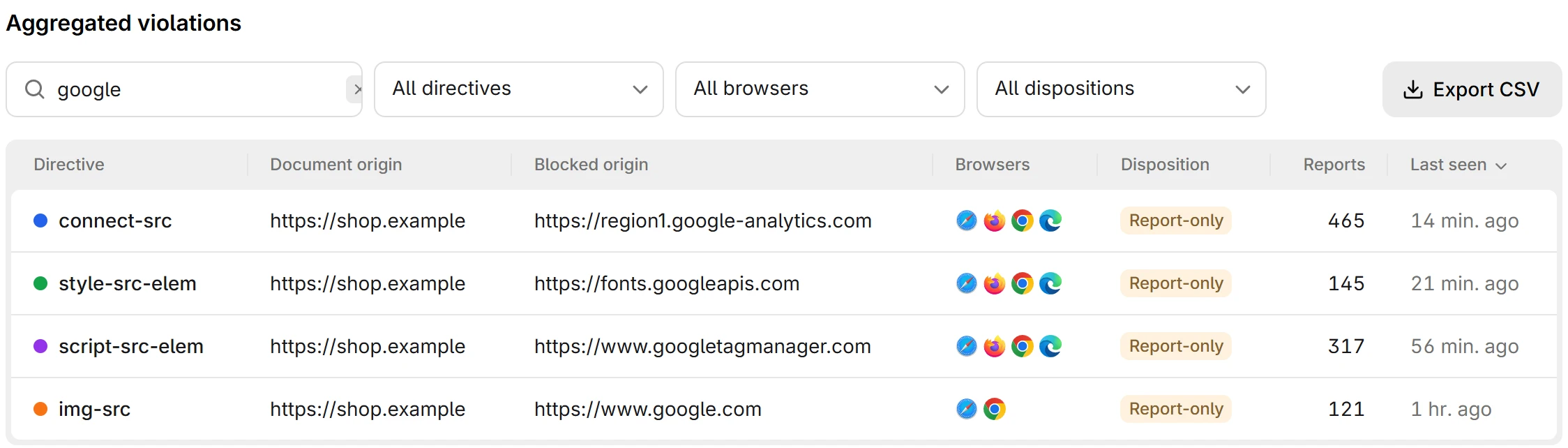
CentralCSP collects those Report-Only violation reports, groups them by directive and origin, and shows the scripts running on each page, so you can see precisely which Google host a tag wants before you enforce. You can start a free trial, point a Report-Only header at it, and watch the reports arrive from real traffic. To audit a policy a live site already sends, the CSP scanner checks it, and the CSP evaluator scores it for weaknesses like a stray host allowlist or a missing object-src.
Frequently asked questions
Do I need to add googletagmanager.com to script-src?
No. With a nonce and 'strict-dynamic' in script-src, the browser ignores host allowlists for scripts. You put the nonce on the GTM bootstrap script instead, and 'strict-dynamic' trusts gtm.js and the tags GTM loads.
Why does GA4 still get blocked with the right script-src?
Because GA4 sends data over connect-src, not script-src. Add https://*.google-analytics.com and the related Google hosts to connect-src. Use the wildcard so regional endpoints like region1.google-analytics.com are allowed.
Does GTM require unsafe-eval?
Only if you use Custom JavaScript variables or certain legacy custom tags. Rebuild those as GTM Custom Templates, which are sandboxed and run without 'unsafe-eval', so you can keep the keyword out of your policy.
Can I run GTM with a strict nonce-based CSP at all?
Yes. Use Google's official nonce-propagating bootstrap snippet, put the per-response nonce on it and in the CSP header, and add 'strict-dynamic'. That is the supported strict-CSP setup for GTM and GA4.
The takeaway
A strict CSP and Google Analytics are not in conflict. Put a fresh per-response nonce on the GTM bootstrap script, add 'strict-dynamic' to script-src, and let trust propagate to gtm.js and the tags it loads. Keep Google hosts out of script-src, where they are ignored, and add them to connect-src, img-src, and frame-src, where the fetches actually happen. Avoid 'unsafe-eval' by preferring Custom Templates, and test the whole thing in Report-Only first so a new tag never breaks analytics in production.