Alerts
Your site changed. Your team already knows.
Add a rule once. When a real visitor's browser reports the change, the message is already in the channel that owns that page.
Fires on ingest
Not a nightly sweep
Six destinations
Chat, email or webhook
Routed per site
And per team
No agent
One response header
Set up your first alert rule takes about ten minutes.
Triggers
What's worth interrupting someone for.
An alert rule is an event a browser reported, a page scope, one or more channels and a cooldown. New origin, script change detected by hash, payment-page tamper detection: the source is always the browser's own report, never a crawler or an injected agent.
A new origin appears
A script loaded from a host you have never seen. Magecart and formjacking skimmers open exactly here: a new host, then a card form quietly reporting to it.
A script changed
A file you execute no longer matches yesterday's hash. Your build did it, or somebody else did.
Something touched a payment page
Card-data pages get their own rules, because PCI DSS 11.6.1 asks you to alert on changes to them.
A known CVE turns up
A library you load has a published advisory. You hear it with the version and the CVE id. See how the script inventory finds them.
Reports spike
Violations jumped after the 4pm deploy. Something broke at scale, and the browsers said so first.
A silent signal wakes up
A directive that reported nothing all quarter started talking. Worth a look before it is worth an incident.
Channels
This is what an alert looks like.
The same rule, reaching three teams where they already work. Every rule picks its own destination, so a checkout incident and a marketing-site warning never land in the same thread.

#payments-security
Just nowNew origin on your checkout
A script started loading from a host that has never appeared in your reports.
- Page
- /checkout
- Origin
- cdn.pixel.io
- Browsers
- 412
'%20gradientUnits='userSpaceOnUse'%3e%3cstop%20offset='0'%20style='stop-color:%235a62c3'/%3e%3cstop%20offset='.5'%20style='stop-color:%234d55bd'/%3e%3cstop%20offset='1'%20style='stop-color:%233940ab'/%3e%3c/linearGradient%3e%3cpath%20d='M21.8%20125h218.3c12.1%200%2021.8%209.8%2021.8%2021.8v218.3c0%2012.1-9.8%2021.8-21.8%2021.8H21.8C9.8%20387%200%20377.2%200%20365.2V146.8c0-12%209.8-21.8%2021.8-21.8'%20style='fill:url(%23microsoft-teams_svg__SVGID_1_)'/%3e%3cpath%20d='M188.4%20208.1h-43.6v118.8H117V208.1H73.5V185h114.9z'%20style='fill:%23fff'/%3e%3c/svg%3e)
Frontend
2 min agoA script you load has changed
The file no longer matches the hash it had yesterday.
- Script
- widget.min.js
- Hash
- sha384-9Qk2…
- Page
- /product/*
Every destination a rule can reach
- Slack
- Microsoft Teams
 Google Chat
'%20gradientUnits='userSpaceOnUse'%3e%3cstop%20offset='0'%20style='stop-color:%231d93d2'/%3e%3cstop%20offset='1'%20style='stop-color:%2338b0e3'/%3e%3c/linearGradient%3e%3ccircle%20cx='256'%20cy='256'%20r='256'%20style='fill:url(%23telegram_svg__a)'/%3e%3cpath%20d='m173.3%20274.7%2030.4%2084.1s3.8%207.9%207.9%207.9%2064.5-62.9%2064.5-62.9l67.3-129.9-169%2079.1z'%20style='fill:%23c8daea'/%3e%3cpath%20d='m213.6%20296.3-5.8%2062s-2.4%2019%2016.5%200c19-19%2037.2-33.6%2037.2-33.6'%20style='fill:%23a9c6d8'/%3e%3cpath%20d='m173.8%20277.7-62.5-20.4s-7.5-3-5.1-9.9c.5-1.4%201.5-2.6%204.5-4.7C124.6%20233.1%20367%20146%20367%20146s6.8-2.3%2010.9-.8c2%20.6%203.6%202.3%204%204.4.4%201.8.6%203.7.5%205.5%200%201.6-.2%203.1-.4%205.4-1.5%2023.8-45.7%20201.6-45.7%20201.6s-2.6%2010.4-12.1%2010.8c-4.7.2-9.3-1.6-12.6-4.9-18.6-16-82.8-59.2-97-68.6-.6-.4-1.1-1.1-1.2-1.9-.2-1%20.9-2.2.9-2.2s111.8-99.4%20114.8-109.8c.2-.8-.6-1.2-1.8-.9-7.4%202.7-136.2%2084.1-150.4%2093-.9.2-2%20.3-3.1.1'%20style='fill:%23fff'/%3e%3c/svg%3e) Telegram
Telegram- Webhooks
Setup
Configured once, then it runs without you
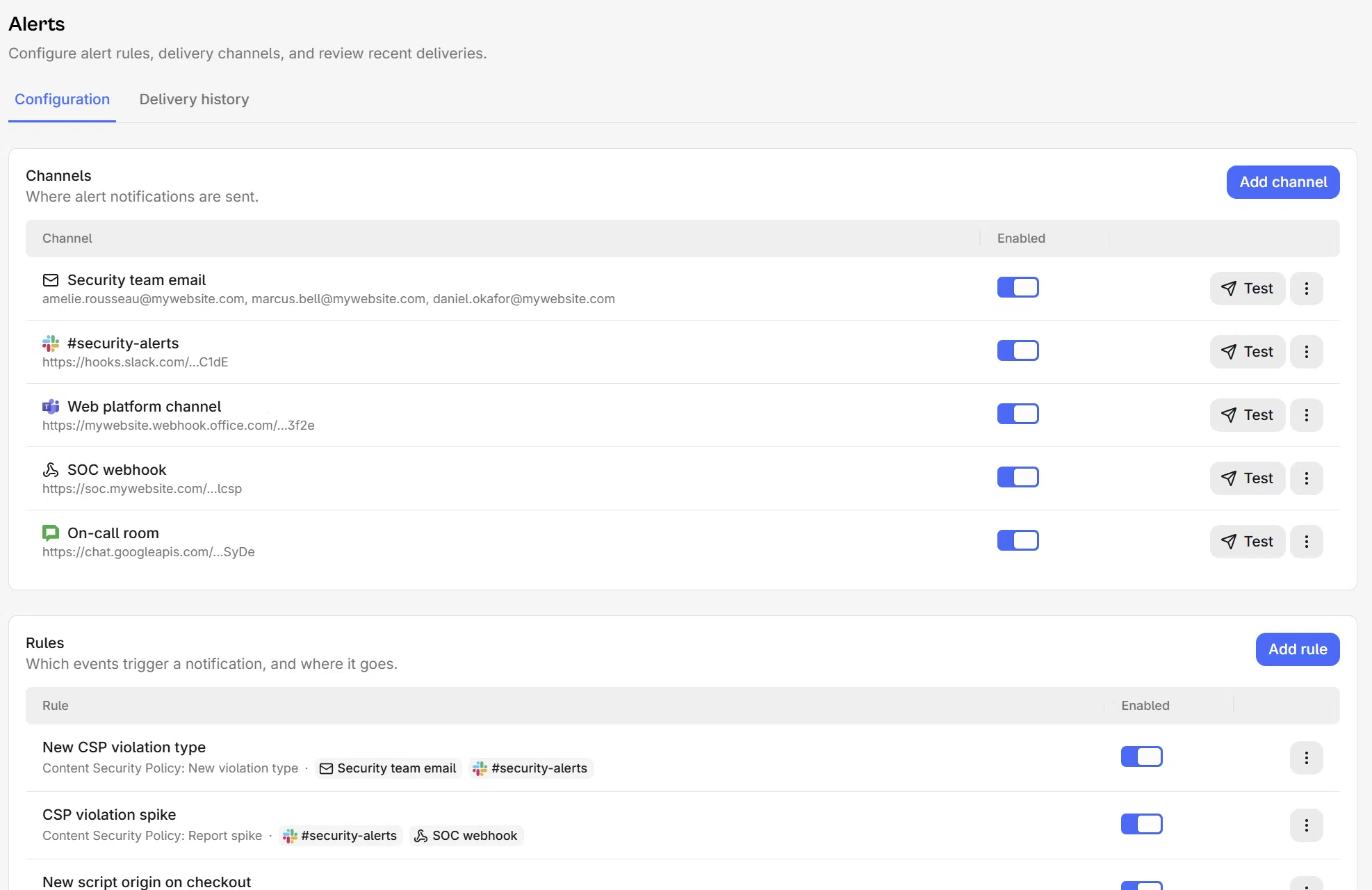
Channels, rules and delivery history live on one screen. Connect a destination, point rules at it, then check afterwards what actually went out.

Every rule reaches the team that owns the page
Add a channel, Slack, Teams, Google Chat, Telegram, email or a webhook, then choose which events reach it. A new origin on checkout goes to the payments team, a broken directive on the blog goes to whoever ships the blog.
One message, not four hundred
Reports arrive deduped and grouped, and every rule takes a cooldown, so a bad deploy interrupts someone once.
Delivery history per channel
Every attempt is recorded with its status and the reason it failed, and transient failures are retried. No guessing whether a message went out.
API and MCP
Rules are a REST resource, and the same operations run over the built-in MCP server. Onboarding a hundred sites is a loop.
Further reading
Set up your first rule
Every event a rule can watch, every channel it can reach, and what happens when a delivery fails.
FAQ
Frequently asked questions
Channels, speed, noise and compliance, answered.
Set one rule today. Forget about it until it matters.
Add the header, connect a channel, pick the change worth a message. 14-day free trial, no agent to deploy.