

Custom subdomain
Replace the random endpoint hostname with a name you choose. CentralCSP creates the DNS record, you update your headers afterwards.
Last update:
Every website gets a randomly generated endpoint hostname when you create it. Claiming a subdomain swaps that for a label you choose, so your headers read acme.report.centralcsp.com instead of a string of hex.
This is cosmetic and organizational. It changes nothing about how reports are collected or attributed.
Requirements
You need both of the following:
- A plan that includes custom subdomains.
- The website Manager role or higher.
Claim a subdomain
Claim a subdomain in four steps:
- Open the website and go to Setup.
- Under Reporting endpoint, select Claim subdomain.
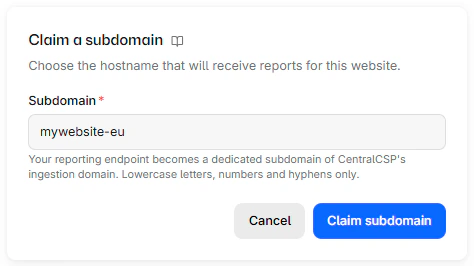
- Enter the label you want. This is the leftmost part of the hostname only, not a full domain.
- Confirm.
There is no DNS work on your side and no verification step. CentralCSP creates the DNS record for you.
Update your headers right away
Claiming a subdomain does not rewrite your site's headers, and the old endpoint hostname stops accepting reports as soon as the claim goes through. Copy the new header block from Setup and deploy it. Reports browsers send to the old hostname in the meantime are lost.
To keep that gap short, claim the subdomain when you are ready to redeploy your headers.
The dialog takes a single label:
Naming rules
A label must be:
- 1 to 63 characters
- lowercase letters, digits, and hyphens only
- not starting or ending with a hyphen
A label that looks like an automatically assigned hostname (a long hexadecimal string) is rejected, and so are a few reserved names.
Rate limits
Changes are capped before any work happens:
- 3 changes per website per day
- 10 changes per workspace per day
Both windows are rolling 24 hours. Pick a name you intend to keep rather than iterating.
When a name is unavailable
Two different refusals, with different meanings:
- Already claimed: Another website holds it. Names are unique across all of CentralCSP, not just your workspace.
- Quarantined: Someone released it recently and it is being held. The error tells you the date it becomes available again.
Your own workspace can always re-claim a hostname it previously held, so switching back after a mistake is not blocked by quarantine.
The old subdomain
The hostname you leave behind is quarantined for 90 days before anyone else can claim it. This matches the report retention window. Browsers can keep posting to the old URL for a while, from a page left open or a cached Report-To header, and holding the hostname keeps those reports away from any other customer.
Plan around it. If you are cycling through names in a test workspace, each discarded one is out of circulation for a quarter.
Next steps
Connect your site
Copy the headers CentralCSP generates for your website, deploy them, and verify the first report arrives. Three methods, one recommended.
Ingestion filters
Control which origins may report to your endpoint and what gets stripped before storage. Restricting origins protects your quota.