How to fix an Unsafe Implementation of Subresource Integrity finding

CentralCSP Team
CentralCSP ·
Last update:
SecurityScorecard scanned your site and opened a finding named "Unsafe Implementation of Subresource Integrity (SRI)" under its Application Security factor, rated High severity (issue key unsafe_sri_v2). It means the scanner found scripts loading from external hosts without a correct integrity attribute (and often without the crossorigin that goes with it), so the browser is taking those files on trust. The fix is not complicated, it is just a workflow: find which scripts lack SRI, generate the right hashes, and roll the change out safely so you do not break the page.
The short version: list every external script and check which ones are missing a valid integrity/crossorigin pair, generate the hash for each one, add it, and verify in report-only mode before you rely on it. This post walks that workflow end to end.
What the finding actually means
Subresource Integrity (SRI) lets the browser verify that a script it fetched matches a hash you supplied, and refuse it on a mismatch. SecurityScorecard flags the absence of that protection: a <script src> pointing at a CDN or third-party host with no integrity attribute, or one with integrity but no crossorigin (which silently fails for cross-origin files).
One point to be clear about, because it trips people up: adding a Content Security Policy does not clear this finding. Only adding an integrity attribute, with crossorigin, to each affected script or style tag, or self-hosting the resource so it is served same-origin, resolves it. A CSP controls which origins can load, not whether a loaded file was tampered with, so it is the wrong tool for this specific finding.
The underlying risk is real either way. If the third-party host is compromised and serves altered code, an unhashed script runs the tampered file without complaint. That is the formjacking and supply-chain scenario SRI exists to stop.
1. Find the scripts that lack integrity
You cannot hash what you have not inventoried. Start by listing every external script the page loads and marking which ones are missing a correct integrity/crossorigin pair.
A quick scan with the security headers scanner shows the page's header posture, and the script inventory builds the full list of scripts running across your pages from CSP hash reports, including third-party ones that a single page scan misses. If you have an Integrity-Policy running in report-only mode, its integrity-violation reports name each script loaded without integrity metadata or without CORS (a missing crossorigin attribute), which is the precise list you need. A wrong hash is a different failure: SRI itself blocks that file and logs a console error, the policy does not report it.
Watch for the cross-origin trap while you audit: a script can have an integrity attribute and still be unprotected if crossorigin is missing, because the browser cannot read the bytes to verify them.
<script
  src="https://cdn.example.com/widget.js"></script>
<script
  src="https://cdn.example.com/widget.js"
  integrity="sha384-<digest>"
crossorigin="anonymous"></script> 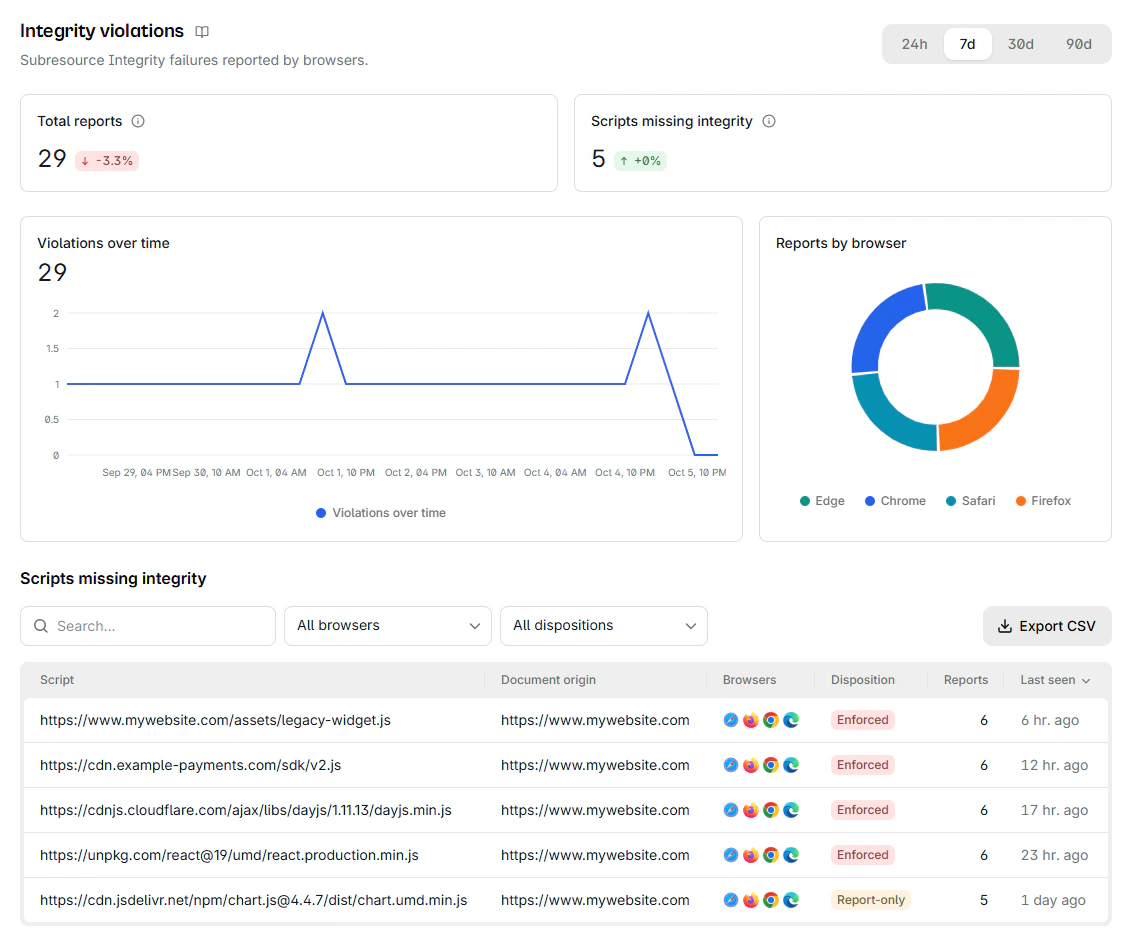
2. Generate the hash for each script
For each script on the list, generate its hash. Paste the URL into the SRI generator, which produces the full integrity value (SHA-256, SHA-384, and SHA-512) from the exact file the host serves. Use SHA-384 or SHA-512; if you list more than one algorithm, the browser checks against the strongest one present.
Pin a versioned URL, not a "latest" one. SRI does not auto-update, so a hash on a URL that always points at the newest build will break the moment the upstream file changes. Pin the version, hash that exact file, and update both together when you upgrade. The SRI explainer and the free SRI hash generator cover the mechanics.
3. Roll it out in report-only first
Adding hashes is safe per tag, but if you also want to enforce SRI across the whole site so the finding cannot come back, do it in report-only mode first. An Integrity-Policy-Report-Only header reports every script that still lacks valid integrity without blocking anything, so you confirm your coverage before you enforce.
Reporting-Endpoints: integrity-endpoint="https://<Endpoint-ID>.report.centralcsp.com"Integrity-Policy-Report-Only: blocked-destinations=(script), endpoints=(integrity-endpoint)The policy covers every external script on the page, your own same-origin bundles included, not only third parties. In Chromium a script passes only if it carries integrity and is fetched in CORS mode, and a classic <script src> without crossorigin is a no-cors request even on your own origin. So add crossorigin="anonymous" to your own tags as well, or the policy reports them. Inline scripts and data: or blob: URLs are not affected.
Leave it running until no more scripts show up in the reports. Then drop the -Report-Only suffix to enforce. Enforcing before the report is clean would block legitimate but un-hashed scripts and take the page down, which is why report-only goes first.
4. Verify and rescan
Once the hashes are in place and the report-only stream is quiet, rescan with the rating service (or the security headers scanner) to confirm the finding clears. Keep the inventory and reporting on after that: the finding comes back the moment someone adds a new unhashed third-party tag, and an ongoing script inventory catches that change before the next scan does.
CentralCSP keeps that loop running, inventory of every script, integrity-violation reports, and alerting when a new or changed script appears, so the finding stays closed instead of reopening at the next audit. Start free to inventory your scripts and watch for the next gap.
Sources
- SecurityScorecard, Unsafe Implementation of Subresource Integrity (SRI)
- MDN, Subresource Integrity
- W3C, Subresource Integrity, Integrity-Policy
- Chromium, integrity_policy.cc (
AllowRequest, integrity plus a non-no-corsmode)
Related
- Subresource Integrity (SRI) explained
- SRI hash generator, to hash a file or URL in the browser
- Integrity-Policy reference